Loading
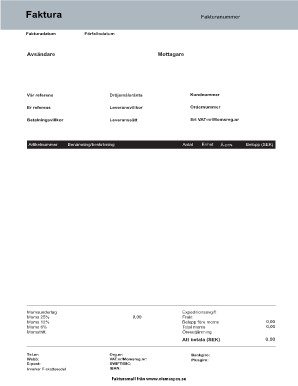
Get Hyresfaktura
How it works
-

Open form follow the instructions
-

Easily sign the form with your finger
-

Send filled & signed form or save
How to fill out the Hyresfaktura online
Navigating the Hyresfaktura form online can be streamlined with clear guidance. This document provides a detailed overview of each section, ensuring users can effortlessly complete it with confidence.
Follow the steps to successfully fill out the Hyresfaktura online.
- Press the ‘Get Form’ button to obtain the Hyresfaktura and open it in your preferred digital editor.
- In the 'Fakturadatum' section, enter the date the invoice is issued, ensuring it is current and accurate.
- Next, input the 'Fakturanummer,' which is a unique invoice number that helps in tracking payments.
- Fill out the 'Förfallodatum' with the payment due date, allowing for timely processing.
- Complete the 'Avsändare' section to include the sender's information, such as your name or business name.
- Provide the recipient's information in the 'Mottagare' section, ensuring accuracy to avoid delivery issues.
- Fill in 'Vår referens' with your reference number or code relevant to the transaction.
- Indicate any applicable 'Dröjsmålsränta,' which represents the late payment interest rate that may apply.
- Enter the customer's unique identification in the 'Kundnummer' field.
- In the 'Er referens' section, include any reference from the recipient that is applicable.
- Specify the 'Leveransvillkor' to clarify the delivery conditions of the goods or services.
- Provide the 'Ordernummer' corresponding to the order associated with this invoice.
- In 'Betalningsvillkor,' detail the payment terms agreed upon with the recipient.
- Select the 'Leveranssätt,' outlining how the goods or services will be delivered.
- Include both the sender's and recipient's VAT numbers in the 'Ert VAT-nr/Momsreg.nr' section.
- List the 'Artikelnummer' for each item included in the invoice for clarity.
- In the tax sections, break down applicable VAT amounts, including 'Moms 25%,' 'Moms 12%,' 'Moms 6%,' and 'Momsfritt' to accurately reflect tax liability.
- Enter descriptions and quantities in the 'Benämning/beskrivning' and 'Antal' fields, respectively.
- Provide unit prices under 'Enhet' and calculations for totals before tax and the overall total.
- Complete any additional fees such as 'Expeditionsavgift' and 'Frakt' as necessary.
- Ensure all sections are filled thoroughly to avoid errors, and calculate the final total under 'Att betala (SEK).'
- Once complete, save your changes. You may now download, print, or share the completed Hyresfaktura.
Complete your Hyresfaktura online today for streamlined document management.
ing to the changes made in the hours-of-service rules, a driver must stay in the sleeper berth for seven consecutive hours, and then spend another three consecutive hours off duty (sleeping, eating, etc.) to fulfill the requirements of the sleeper berth.