Loading
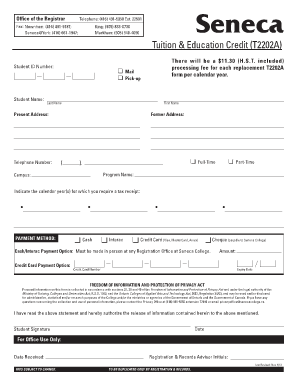
Get Seneca College T2202a
How it works
-

Open form follow the instructions
-

Easily sign the form with your finger
-

Send filled & signed form or save
How to fill out the Seneca College T2202a online
Filling out the Seneca College T2202a form online is a straightforward process designed to help you obtain your tuition tax receipt efficiently. This guide will provide you with step-by-step instructions to ensure you complete the form accurately and meet your needs.
Follow the steps to complete the Seneca College T2202a form
- Click 'Get Form' button to access the T2202a document and open it in your preferred editor.
- Enter your student ID number in the designated field to confirm your identity with the college records.
- Provide your full name, including your last name and first name, ensuring it matches the official records.
- Select your current mailing or pick-up preference for receiving the form.
- Fill in your present address and telephone number to ensure the college can contact you if necessary.
- If applicable, include your former address in the corresponding field.
- Indicate whether you were a full-time or part-time student by selecting the appropriate option.
- Input your program name and campus location to provide relevant context for your application.
- Specify the calendar year(s) for which you require the tax receipt by selecting from the available options.
- Choose your preferred payment method for any processing fees, noting that payments can be made using cash, Interac, credit card, or cheque.
- If you selected credit card as your payment method, fill in the necessary details including credit card number and expiry date.
- Read the statement regarding the Freedom of Information and Protection of Privacy Act, then provide your signature and the date to authorize the release of information.
- Finally, review all entries for accuracy, then save your changes. You may print or share the completed form as required.
Complete your Seneca College T2202a form online today for a smooth and efficient process.
You can access and print your T2202 form via Student Home. Note: For Children's Programs, retain the original Confirmation of Registration for income tax purposes. No other receipt will be issued. In accordance with Revenue Canada regulations, T2202A forms are only issued for tuition fees totaling $100 or more.