Loading
Form preview
  • US Legal Forms
  • Other Templates
  • More Forms
  • More Uncategorized Forms
  • Epo Ppo Corrected Professional Paper Claim Form

Get Epo Ppo Corrected Professional Paper Claim Form

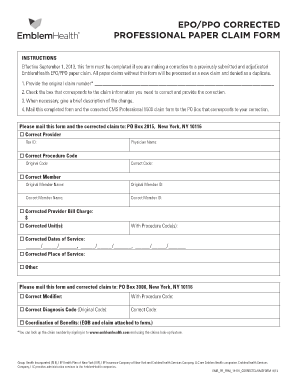
EPO/PPO CORRECTED PROFESSIONAL PAPER CLAIM FORM INSTRUCTIONS Effective September 1, 2013, this form must be completed if you are making a correction to a previously submitted and adjudicated EmblemHealth.

How it works

  1. Open form

    Open form follow the instructions

  2. Easily sign form

    Easily sign the form with your finger

  3. Share form

    Send filled & signed form or save

How to fill out the Epo Ppo Corrected Professional Paper Claim Form online

The Epo Ppo Corrected Professional Paper Claim Form is essential for correcting any previously submitted claims. This guide will provide you with clear, step-by-step instructions for successfully completing the form online, ensuring all corrections are properly submitted.

Follow the steps to accurately complete the form online.

  1. Click ‘Get Form’ button to obtain the form and open it in the editor.
  2. Enter the original claim number in the designated field. This is necessary for identifying the claim needing correction.
  3. Select the box corresponding to the information you need to correct. Provide the necessary corrections in the provided fields.
  4. If required, add a brief description of the changes you are making to provide context for the corrections.
  5. For each correction regarding the provider, procedure code, member information, or diagnosis, ensure to fill out the original and correct details as indicated.
  6. After filling out all necessary fields, carefully review your entries for accuracy.
  7. Save the changes you have made to the form. You may then choose to download, print, or share the completed form as necessary.

Take the next step and complete your Epo Ppo Corrected Professional Paper Claim Form online today.

Get form

Experience a faster way to fill out and sign forms on the web. Access the most extensive library of templates available.
Get form

Related content

Professional claim guide - Ohio Department of...
MITS WEB PORTAL BILLING GUIDE FOR PROFESSIONAL CLAIMS. Revised ... In lieu of signing an...
Learn more
University of Utah Health Plans Provider Manual
Nov 17, 2020 — If you must submit a corrected claim on a paper claim form: ... and other...
Learn more
NTW00630 Payers Transitioned To 5010 As Of...
Jun 4, 2012 — ... reports for any additional rejections that need correction and...
Learn more

Related links form

INSTRUCTIONS For Research Funding Application An Application Is ... - Gsa Ua Presbyopia & Accommodation - Opt Uab Suicide Squeeze - Opt Uab Assignment #2 - CS104 - Cs104 Cs Ua

Questions & Answers

Get answers to your most pressing questions about US Legal Forms API.

Contact support

The claim adjustment process is used to make corrections to processed or rejected claims. Adjustment claims may be submitted via DDE or your electronic software. Processed and rejected claims are finalized claims and appear on the RA. If a new claim is submitted, it will reject as a duplicate of the original claim.

UB-04: Corrections need to be submitted electronically with a type of bill of XX7 or on a paper UB-04 claim form with type of bill XX7 in box 4. All late charges for UB claims must be consolidated into one claim for submission. If the late charges are received separately, they will be denied as a billing error.

Corrected Claim Submission: EDI Claims Corrections can be sent in an electronic format. On the CMS-1500 Form, use Corrected Claim Indicator (Medicaid Resubmission Code). Enter the frequency code "7" in the "Code" field and the original claim number in the "Original Ref No." field.

A beneficiary or provider may submit a "corrected claim" that changes the diagnosis and/or procedure code. When that happens, the claim becomes a formal appeal.

Professional Claims If you are submitting a void/replacement paper CMS 1500 claim, please complete box 22. For replacement or corrected claim enter resubmission code 7 in the left side of item 22 and enter the original claim number of the claim you are replacing in the right side of item 22.

Complete box 22 (Resubmission Code) to include a 7 (the "Replace" billing code) to notify us of a corrected or replacement claim, or insert an 8 (the “Void” billing code) to let us know you are voiding a previously submitted claim.

WHAT IS A CORRECTED CLAIM? A corrected claim is a replacement of a previously billed claim that requires a revision to coding, service dates, billed amounts or member information.

UB-04 claim form This field is used to capture the original reference/claim number, which is required for corrected claims.

Get This Form Now!

Use professional pre-built templates to fill in and sign documents online faster. Get access to thousands of forms.
Get form
If you believe that this page should be taken down, please follow our DMCA take down processhere.
Get Epo Ppo Corrected Professional Paper Claim Form
Get form
  • Adoption
  • Bankruptcy
  • Contractors
  • Divorce
  • Home Sales
  • Employment
  • Identity Theft
  • Incorporation
  • Landlord Tenant
  • Living Trust
  • Name Change
  • Personal Planning
  • Small Business
  • Wills & Estates
  • Packages A-Z
  • Affidavits
  • Bankruptcy
  • Bill of Sale
  • Corporate - LLC
  • Divorce
  • Employment
  • Identity Theft
  • Internet Technology
  • Landlord Tenant
  • Living Wills
  • Name Change
  • Power of Attorney
  • Real Estate
  • Small Estates
  • Wills
  • All Forms
  • Forms A-Z
  • Other Templates
  • Legal Hub
  • About Us
  • Help Portal
  • Legal Resources
  • Blog
  • Affiliates
  • Contact Us
  • Delete My Account
  • Site Map
  • Industries
  • Forms in Spanish
  • Localized Forms
  • State-specific Forms
  • Forms Kit
  • Real Estate Handbook
  • All Guides
  • Notarize
  • Incorporation services
  • For Consumers
  • For Small Business
  • For Attorneys
  • USLegal
  • FormsPass
  • pdfFiller
  • signNow
  • altaFlow
  • DocHub
  • Instapage
Form Packages
  • Adoption
  • Bankruptcy
  • Contractors
  • Divorce
  • Home Sales
  • Employment
  • Identity Theft
  • Incorporation
  • Landlord Tenant
  • Living Trust
  • Name Change
  • Personal Planning
  • Small Business
  • Wills & Estates
  • Packages A-Z
Form Categories
  • Affidavits
  • Bankruptcy
  • Bill of Sale
  • Corporate - LLC
  • Divorce
  • Employment
  • Identity Theft
  • Internet Technology
  • Landlord Tenant
  • Living Wills
  • Name Change
  • Power of Attorney
  • Real Estate
  • Small Estates
  • Wills
  • All Forms
  • Forms A-Z
  • Other Templates
Customer Service
  • Legal Hub
  • About Us
  • Help Portal
  • Legal Resources
  • Blog
  • Affiliates
  • Contact Us
  • Delete My Account
  • Site Map
  • Industries
  • Forms in Spanish
  • Localized Forms
  • State-specific Forms
  • Forms Kit
Legal Guides
  • Real Estate Handbook
  • All Guides
Prepared for you
  • Notarize
  • Incorporation services
Our Customers
  • For Consumers
  • For Small Business
  • For Attorneys
Our Sites
  • USLegal
  • FormsPass
  • pdfFiller
  • signNow
  • altaFlow
  • DocHub
  • Instapage
Social Media
Call us now toll free:
+1 833 426 79 33
As seen in:
© Copyright 1999-2026 airSlate Legal Forms, Inc. 17 Station Street, Ste. 203, Brookline, MA 02445
  • Your Privacy Choices
  • Terms of Service
  • Privacy Notice
  • Content Takedown Policy
  • Bug Bounty Program