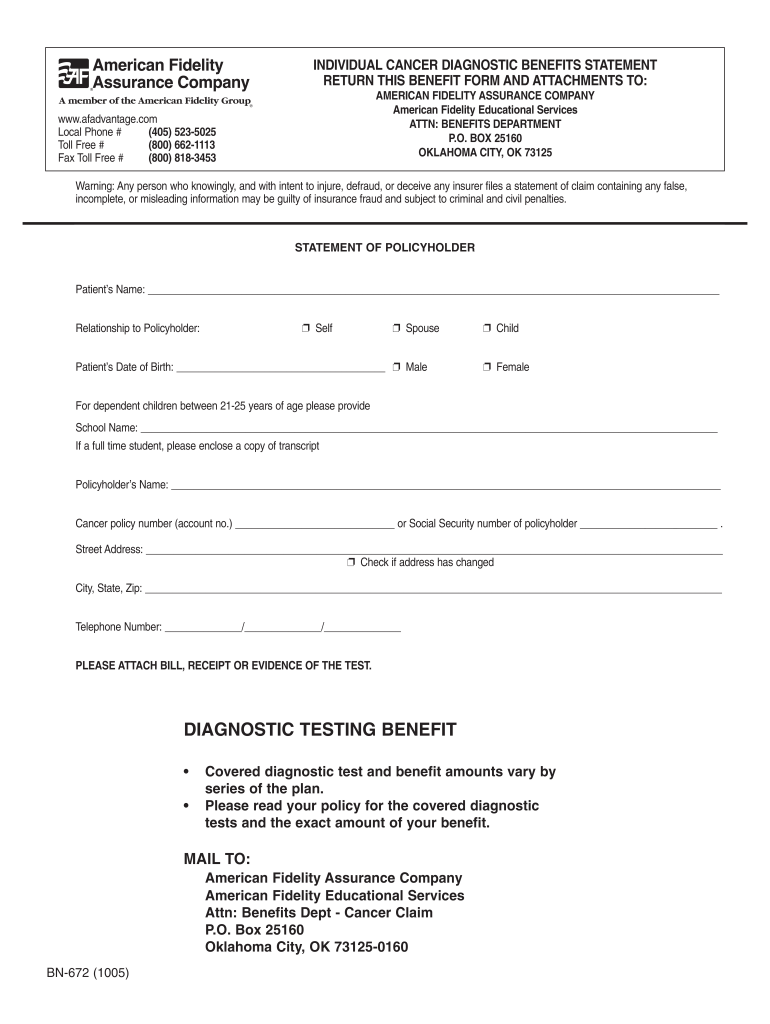
INDIVIDUAL CANCER DIAGNOSTIC BENEFITS STATEMENT RETURN THIS BENEFIT FORM AND ATTACHMENTS TO: AMERICAN FIDELITY ASSURANCE COMPANY American Fidelity Educational Services ATTN: BENEFITS DEPARTMENT P.O.
Loading

Open form follow the instructions

Easily sign the form with your finger

Send filled & signed form or save
How to fill out the Fidelity Cancer Screening Reimbursement online
Navigating the process of claiming reimbursement for cancer screening can be streamlined with the right guidance. This guide provides clear, step-by-step instructions on how to effectively fill out the Fidelity Cancer Screening Reimbursement form online, ensuring that users have all the necessary information at their fingertips.
Follow the steps to successfully complete your reimbursement form
- Click ‘Get Form’ button to obtain the Fidelity Cancer Screening Reimbursement form and open it in your chosen editor.
- Begin by filling in the patient’s name in the designated field. Ensure you include the full name as it appears on official documents.
- Select the relationship to the policyholder from the options provided by marking the appropriate box (self, spouse, child). If the patient is a dependent child aged between 21-25, include the school name and submit a copy of the transcript.
- Input the patient’s date of birth accurately, and select the correct gender by marking the appropriate option.
- Complete the policyholder’s name field with the full name of the person holding the cancer policy.
- Provide the cancer policy number or social security number of the policyholder in the specified section.
- Fill in the street address of the policyholder, ensuring to check the box if the address has changed.
- Enter the city, state, and zip code in the corresponding fields.
- Include a telephone number where the policyholder can be reached, formatted in three sections.
- Attach any necessary bills, receipts, or evidence of the tests undergone. This documentation is critical for verifying the claim.
- Review all the information for accuracy before finalizing the document. Once complete, you can save changes, download, print, or share the form as required.
Complete your Fidelity Cancer Screening Reimbursement form online today to ensure you receive your benefits.
Experience a faster way to fill out and sign forms on the web. Access the most extensive library of templates available.
Related content
ESB-4015-0319 americanfidelity.com. What are Your Benefit Options? • Accident Only...
Cancer screenings can help detect Cancer earlier which could increase your survival...
Wyoming Medicaid is required to comply with the coding restrictions under the ... (high...
Get answers to your most pressing questions about US Legal Forms API.
What is American Fidelity cancer policy?
AF Limited Benefit Cancer Insurance is designed to help pay for cancer treatment costs as well as help cover the costs of transportation and lodging if you receive treatment out of town. The fastest way to file a cancer insurance claim is through your online account or our mobile app, AFmobile®.
How long does it take American Fidelity to process a claim?
Claims are generally processed within 5-7 business days. How do I check my claim status? The fastest way to check the status of a claim is through your online account, or on our mobile app, AFmobile®. When you file a claim, it will be located under In Process until it has been processed.
How do I file a claim with American Fidelity?
Log in to your online account. Click the File a Claim button. Select Reimbursement Account. Complete the claim form. Click the Submit button.
What does American Fidelity accident cover?
Benefits include emergency room treatment, ambulance transportation, follow-up treatment and a wellness benefit. Benefit payments made directly to you. Benefits regardless of other coverage. ... Guaranteed renewability for the base plan for as long as you pay your premiums as required.
Use professional pre-built templates to fill in and sign documents online faster. Get access to thousands of forms.
If you believe that this page should be taken down, please follow our DMCA take down process here.