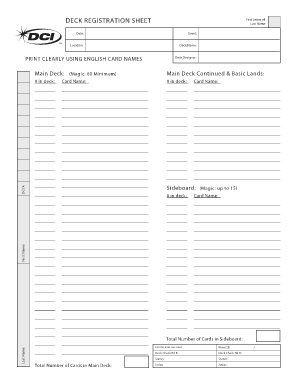
Card Name: Card Name: Date: Location: Event: Deck Name: Deck Designer: L ast N a m e. : First N ame. : DCI #. : FOR OFFICIAL USE ONLY. Deck Check Rd #: .
Open form follow the instructions
Easily sign the form with your finger
Send filled & signed form or save
How to fill out the Registration Sheet online
The Registration Sheet is an essential document for event participants, providing crucial information needed for registration and deck validation. This guide will walk you through the steps to effectively complete the sheet online, ensuring a smooth registration process.
Follow the steps to complete the Registration Sheet online.
- Click ‘Get Form’ button to obtain the form and open it in the editor.
- Enter the first letter of your last name in the designated field.
- Fill out the date of registration. Ensure that the date is accurate and formatted correctly.
- Specify the event you are registering for by writing the event name in the appropriate section.
- Indicate the location of the event where you will be participating.
- Type in the name you are giving your deck in the 'Deck Name' section.
- Enter the name of the deck designer, if applicable.
- For the main deck, list a minimum of 60 cards. Use the 'Main Deck' field to begin listing card names, ensuring clarity.
- Continue to fill in the 'Main Deck Continued & Basic Lands' section as necessary, keeping track of the number of cards entered.
- Fill in the DCI number associated with your registration.
- For the sideboard, list cards up to a maximum of 15, starting with 'Sideboard' in the proper section.
- Provide your first name and last name in their designated fields.
- Count and enter the total number of cards in the sideboard and main deck respectively.
- Double-check all entries for accuracy and clarity.
- Once completed, save your changes, then choose to download, print, or share the form as needed.
Complete your registration forms online today!
Experience a faster way to fill out and sign forms on the web. Access the most extensive library of templates available.
Related content
Cover Sheet for Corporate Filings. BE-01 ... Application to Register a Business Entity...
Find the access times during which you can register online by checking your Registration...
A vehicle (from Latin: vehiculum) is a machine that transports people or cargo. Vehicles...
Get answers to your most pressing questions about US Legal Forms API.
How do I create a registration form in Word?
Step 1: Display the "Developer" Section. Go into the "File" tab; then click "Options." ... Step 2: Create a Form Template. ... Step 3: Add Content to This Form. ... Step 4: Set Properties for Content Controls. ... Step 5: Include Instructional Text to Your Form. ... Step 6: Include Protection to Your Form.
How do I create a registration form?
0:08 5:21 Suggested clip How to Create Registration Form in HTML - Easy Step ... - YouTubeYouTubeStart of suggested clipEnd of suggested clip How to Create Registration Form in HTML - Easy Step ... - YouTube
How do I register for classes at UT?
View Your Registration Information Sheet. View Your Registration Information Sheet (RIS) to determine your access period and access time. ... Meet With Your Academic Advisor. ... Clear Your (Non-)Financial Bars. ... Register for Classes.
What do you mean by registration?
Registration is a method of officially recording something. Usually something is registered to claim more rights, or to protect ownership, or because the law says it must be registered to be used legally. A register was a large book. It was used like a diary to record business dealings or other events.
How do I create a registration link?
Log in to Your AidaForm Account. Before creating an online registration form, you need to log in to AidaForm. ... Create a Registration Form. ... Adjust the Design. ... Set Up Payment Collection (Optional) ... Publish Your Form.
How do I create an online form for free?
Create a form. Build and customize your form with our easy-to-use form builder. Share it. Link to your form on any page, embed it on a site, or use our REST API. Collect data and payments. Get notified as responses come in, or set up a real-time report.
How do I create an online registration form?
Log in to Your AidaForm Account. Before creating an online registration form, you need to log in to AidaForm. ... Create a Registration Form. ... Adjust the Design. ... Set Up Payment Collection (Optional) ... Publish Your Form.
Use professional pre-built templates to fill in and sign documents online faster. Get access to thousands of forms.
If you believe that this page should be taken down, please follow our DMCA take down process here.