Loading
Get Iata Books Download
How it works
-

Open form follow the instructions
-

Easily sign the form with your finger
-

Send filled & signed form or save
How to fill out the Iata Books Download online
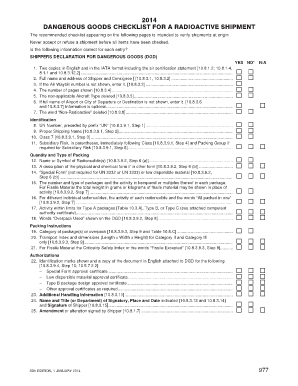
The Iata Books Download is an essential document for managing the shipment of dangerous goods, specifically radioactive materials. This guide provides step-by-step instructions to assist users in accurately completing this critical form online.
Follow the steps to successfully complete the form
- Press the ‘Get Form’ button to access the document and open it in your selected editor.
- Begin by reviewing the shipper's declaration for dangerous goods, ensuring that you have two copies prepared in English, formatted according to Iata standards. Confirm the air certification statement is included.
- Enter the full name and address of both the shipper and the consignee in the designated fields.
- Input the Air Waybill number if it has not been previously provided.
- Ensure the number of pages is correct as indicated on the form.
- Remove any non-applicable Aircraft Type entries as directed.
- If specific airport or city details are required but not included, input the full names of the point of departure and destination.
- Delete the phrase 'Non-Radioactive' from the form if applicable.
- Document the UN number, ensuring it is preceded by the prefix 'UN.'
- Specify the proper shipping name for the materials being transported.
- Indicate the appropriate Class number, which in this case should be Class 7.
- If necessary, provide the subsidiary risk information in parentheses immediately following the class designation.
- Include the name or symbol of the radionuclide(s) present in the shipment.
- Describe the physical and chemical form of the material when it is not in its standard form.
- State 'Special Form' if applicable or indicate if the material is categorized as low dispersible material.
- Detail the number and type of packages, including activity measurements in becquerel or specify the total weight for fissile material.
- For unique radionuclide entries, ensure that the activity of each one is recorded, accompanied by the phrase 'All packed in one.'
- Check that the activity conforms to limits for Type A, Type B, or Type C packages as per the related authority certificate.
- Mark 'Overpack Used' on the document where necessary.
- Complete the packing instructions, specifying the category of packaging.
- Record the transport index and dimensions for Category II and III packages.
- Attach identification marks and any necessary approval certificates in English as directed.
- Include any additional handling information that might be required.
- Finally, fill in the name and title of the signatory, date, place, and ensure that the shipper's signature is affixed.
- Review the document for any amendments or alterations that must also be signed by the shipper.
- After completing all fields, save any changes, download the form for your records, or share it as necessary.
Complete your documents online and ensure compliance with regulations for shipping dangerous goods.
As a reliable source for international standards, the IATA manuals have become the primary source of information for air transport standards. Learn more. Search Manuals, Standards & Regulations.