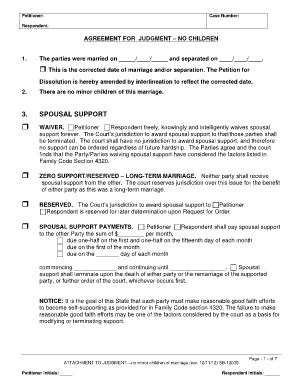
Petitioner: Case Number: Respondent: AGREEMENT FOR JUDGMENT NO CHILDREN 1. The parties were married on / / and separated on / / . ? This is the corrected date of marriage and/or separation. The Petition.
Open form follow the instructions
Easily sign the form with your finger
Send filled & signed form or save
How to use or fill out the SB-12035 - Sb-court online
Filling out the SB-12035 - Sb-court form online can streamline the process of managing dissolution agreements, especially for those without legal experience. This guide provides a step-by-step approach to ensure a successful completion of the form.
Follow the steps to fill out the SB-12035 form online effectively.
- Click 'Get Form' button to obtain the SB-12035 - Sb-court form and open it in the editor.
- Input the Petitioner's name, which is the individual initiating the court proceedings. Make sure to check for any spelling errors.
- Enter the Case Number that has been assigned to your dissolution proceedings. If you do not have a case number, consult your court documents.
- Fill in the Respondent's name, who is the other party involved in the dissolution.
- In Section 1, indicate the dates of marriage and separation. If applicable, check the box to amend any dates if they need correction.
- Confirm in Section 2 that there are no minor children involved in the marriage.
- Proceed to Section 3 on spousal support. Carefully choose one of the options: waiver, zero support, reserved jurisdiction, or specify spousal support payments.
- In Section 4, outline the division of community property. Confirm whether any property issues exist and specify the distribution of household items or property.
- Section 5 addresses community obligations. Indicate any community debts and how they will be divided.
- Complete Section 6 if there is an equalization payment that needs to be made between parties regarding property or debts.
- For Section 7, specify how retirement accounts will be divided, ensuring to include the financial institution information where necessary.
- In Section 8, declare the separate property for both parties. Remember to exclude assets already listed in the community property section.
- Section 9 allows you to add any other orders, including restoration of former names or additional agreements.
- Review all entered information for accuracy before proceeding to finalize. Users can save changes, download, print, or share the completed form.
Complete your SB-12035 - Sb-court form online with confidence and ease.
Experience a faster way to fill out and sign forms on the web. Access the most extensive library of templates available.
Related content
The Court is Temporarily Suspending Small Claims Proceedings Effective January 4 Through...
Feb 9, 2017 — Over 100 students & faculty observed various court proceedings in Colton &...
Yucca Valley is an incorporated town in San Bernardino County, California, United States...
Get answers to your most pressing questions about US Legal Forms API.
What are the residency requirements for a name change in California?
All states require a Petitioner/Applicant to be a resident of the state -- often for at least six months and sometimes for as long as one year -- before filing for a name change there. Someone who files for a name change, typically, must offer proof that (s)he has resided there for the required length of time.
How can I get the form to change my name?
A Petition for a Change of Name form must be completed. It's the primary document used in order to submit your name change request. This document can be mailed or submitted online depending on your state. Once the form and other documents are completed, go to your local county clerks office to have them reviewed.
What is a stipulation for entry of judgment California?
Tell the court that you have an agreement with the other side to finish your eviction case and are asking the judge to approve them.
What is a notice of pendency of action San Bernardino County?
A Notice of Pending Action, formerly known as a lis pendens, is a document that is recorded to give constructive record notice of a pending lawsuit. The lawsuit must involve a claim which affects (a) title to, or right to possession of, real property; or (b) the use of an easement.
How do I vacate a Judgement in California?
How do I file the motion? Get the form SC-135: Notice of Motion to Vacate Judgment. You must explain on the form why you did not come to court. File the form with the Small Claims Court Clerk's Office at the court where your case was heard. Pay the filing fee.
How to legally change your last name after marriage in California?
If you are getting married, you may be able to change your middle or last name by listing it on your marriage license. Then, once you're married you can use your marriage certificate to change your name on identity documents. You don't need to go to court.
Where do I file a name change in San Bernardino County?
Civil Division of the San Bernardino District, 247 West 3rd St, San Bernardino, CA 92415-0210 (located in the San Bernardino Justice Center) Filings Accepted: C.E.Q.A.
How much does it cost to change your name in San Bernardino County?
You pay a $435-$450 filing fee. If you can't afford the fee, you can ask the court to waive it. The clerk will give you a date when a judge will make a decision.
Use professional pre-built templates to fill in and sign documents online faster. Get access to thousands of forms.
If you believe that this page should be taken down, please follow our DMCA take down process here.