Loading
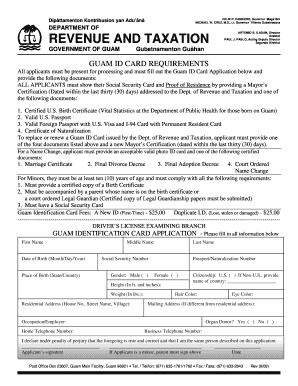
Get Guam Id Application - Govguamdocs.com
How it works
-

Open form follow the instructions
-

Easily sign the form with your finger
-

Send filled & signed form or save
How to fill out the Guam ID Application - GovGuamDocs.com online
Filling out the Guam ID Application online can streamline the process, making it more efficient and accessible. This guide aims to provide clear, step-by-step instructions to help you complete your application accurately and easily.
Follow the steps to complete your Guam ID Application seamlessly.
- Press the ‘Get Form’ button to obtain the application form and open it in the editing interface.
- Begin by entering your first name, middle name, and last name as they appear on your identification documents. Ensure accuracy here to avoid issues.
- Provide your date of birth in the format of month/day/year, and your place of birth (state or country). This information is crucial for verifying your identity.
- Input your Social Security number accurately, as this will be used for identification and verification purposes.
- Select your gender by marking the appropriate box for either male or female. Note that the form is inclusive and does not assume gender.
- List your height in feet and inches, followed by your weight in pounds. This information can be important for identification.
- Fill in your residential address, including house number, street name, and village. This is necessary for residency verification.
- Indicate your citizenship status. If you are a U.S. citizen, check the corresponding box; if you are a non-U.S. citizen, write the name of your country.
- Provide details such as hair color, eye color, and your occupation or employer. This helps complete your identification profile.
- If your mailing address differs from your residential address, enter it in the designated field to ensure the correct delivery of documents.
- Include your home and business telephone numbers for contact purposes.
- Declare your intent by signing the application form. If you are a minor, a parent or legal guardian must sign on your behalf.
- Review all entered information for accuracy. Once confirmed, you can save any changes, download, print, or share the completed form as needed.
Get started on your Guam ID Application today by completing the form online.
Driving: In Guam, driving is on the right-hand side of the road. International Driver's License Accepted? You can drive using your foreign driver's license in Guam.
Industry-leading security and compliance
US Legal Forms protects your data by complying with industry-specific security standards.
-
In businnes since 199725+ years providing professional legal documents.
-
Accredited businessGuarantees that a business meets BBB accreditation standards in the US and Canada.
-
Secured by BraintreeValidated Level 1 PCI DSS compliant payment gateway that accepts most major credit and debit card brands from across the globe.