Loading
Form preview
  • US Legal Forms
  • Other Templates
  • More Forms
  • More Uncategorized Forms
  • Texas Sales And Use Tax List Supplement

Get Texas Sales And Use Tax List Supplement

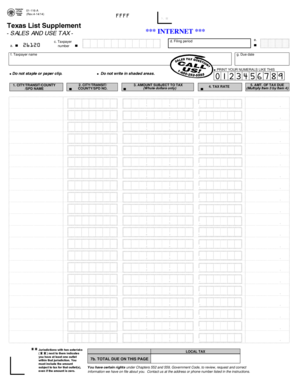
AB CD 01-116-A (Rev.4-14/14) PRINT FORM FFFF Texas List Supplement Instructions in English - SALES AND USE TAX a. b 26120 c. Taxpayer number FILING REQUIREMENTS e. d. Filing period b b f. Taxpayer.

How it works

  1. Open form

    Open form follow the instructions

  2. Easily sign form

    Easily sign the form with your finger

  3. Share form

    Send filled & signed form or save

How to fill out the Texas Sales And Use Tax List Supplement online

Filling out the Texas Sales And Use Tax List Supplement is an essential process for ensuring compliance with state tax regulations. This guide will walk you through the online submission process, helping you complete the form accurately and efficiently.

Follow the steps to successfully complete the form

  1. Click ‘Get Form’ button to access the Texas Sales And Use Tax List Supplement form and open it in your preferred editor.
  2. Provide your taxpayer number in the designated field, ensuring that it is accurate and up-to-date. This number is essential for identifying your tax account.
  3. Enter the filing period in the appropriate section. This refers to the period for which you are reporting sales and use tax.
  4. Fill in your taxpayer name as it appears on your tax records. Double-check for any spelling errors.
  5. Specify the due date for the submission of the form. This can usually be found on correspondence from the tax authority or on the form itself.
  6. List the city, transit, county, or special purpose district (SPD) names where applicable. Make sure to include details for any jurisdiction where you have an outlet.
  7. Enter the corresponding city, transit, county, or SPD numbers for the jurisdictions listed in the previous step.
  8. Indicate the amount subject to tax in whole dollars only for each jurisdiction where you operate. Do not include cents.
  9. Fill in the tax rate applicable to each jurisdiction. This information is crucial as it determines the amount of tax owed.
  10. Calculate the total tax due for each jurisdiction by multiplying the amount subject to tax by the applicable tax rate. Enter this amount in the designated field.
  11. Review all entries for accuracy and completeness. Make any necessary corrections before finalizing the form.
  12. Once all fields are completed, save your changes, and you can choose to download, print, or share the completed form as needed.

Ensure compliance and file your Texas Sales And Use Tax List Supplement online today.

Get form

Experience a faster way to fill out and sign forms on the web. Access the most extensive library of templates available.
Get form

Related content

Form 01-116 - Texas Sales and Use Tax Return- List...
Due date. FFFF. *01116A0W041916*. LOCAL TAX. 7b. TOTAL DUE ON THIS PAGE. 01-116-A...
Learn more
Biennial Revenue Estimate, 2020-2021 Biennium...
Jan 7, 2019 — Sales and Use Taxes. The state's largest source of tax revenue is the...
Learn more
New Jersey - Wikipedia
New Jersey is a state in the Mid-Atlantic region of the Northeastern United States. It is...
Learn more

Related links form

CA BSIS Application For Security Guard Registration 2020 VA 10-9050 2020 Timberland Warranty Return Form 2021 GCAAR 1221 2019

Questions & Answers

Get answers to your most pressing questions about US Legal Forms API.

Contact support

Leased or purchased machinery, equipment, replacement parts, and accessories that have a useful life of more than six months, and that are used or consumed in the manufacturing, processing, fabricating, or repairing of tangible personal property for ultimate sale, are exempt from state and local sales and use tax.

Texas imposes a 6.25 percent state sales and use tax on all retail sales, leases and rentals of most goods, as well as taxable services.

What purchases are exempt from the Texas sales tax? Clothing. 6.25% Groceries. EXEMPT. Prepared Food. 6.25% Prescription Drugs. EXEMPT. OTC Drugs. EXEMPT.

What is Tax Free Shopping? International shoppers can receive refunds on Texas sales tax at TaxFree Shopping, Ltd. Shoppers must present original receipts and items purchased with sales tags still attached from participating retail stores in Texas within 30 days of departing the United States.

ingly, most states offer product-specific exemptions for items such as food, clothing, prescription medicines, and medical (prosthetic) devices. Those states that don't provide a complete exemption for these items often impose a lower tax rate on them. Exemptions based on type of purchaser.

Drugs, Medicines and Dietary Supplements – Nontaxable Over-the-counter drugs and medicines required by the Food and Drug Administration to be labeled with a Drug Facts panel are not taxable. For more information, see Publication 94-155, Sales Tax Exemptions for Healthcare Items. Dietary supplements are not taxable.

An individual can give Form 01-339, Texas Sales and Use Tax Exemption Certification (PDF), to the seller instead of paying sales tax when buying items to be directly donated to the following exempt organizations: religious, charitable, educational, nonprofits exempt under IRC Sections 501(c)(3), (4), (8), (10) or (19), ...

Get This Form Now!

Use professional pre-built templates to fill in and sign documents online faster. Get access to thousands of forms.
Get form
If you believe that this page should be taken down, please follow our DMCA take down processhere.
Get Texas Sales And Use Tax List Supplement
Get form
  • Adoption
  • Bankruptcy
  • Contractors
  • Divorce
  • Home Sales
  • Employment
  • Identity Theft
  • Incorporation
  • Landlord Tenant
  • Living Trust
  • Name Change
  • Personal Planning
  • Small Business
  • Wills & Estates
  • Packages A-Z
  • Affidavits
  • Bankruptcy
  • Bill of Sale
  • Corporate - LLC
  • Divorce
  • Employment
  • Identity Theft
  • Internet Technology
  • Landlord Tenant
  • Living Wills
  • Name Change
  • Power of Attorney
  • Real Estate
  • Small Estates
  • Wills
  • All Forms
  • Forms A-Z
  • Other Templates
  • Legal Hub
  • About Us
  • Help Portal
  • Legal Resources
  • Blog
  • Affiliates
  • Contact Us
  • Delete My Account
  • Site Map
  • Industries
  • Forms in Spanish
  • Localized Forms
  • State-specific Forms
  • Forms Kit
  • Real Estate Handbook
  • All Guides
  • Notarize
  • Incorporation services
  • For Consumers
  • For Small Business
  • For Attorneys
  • USLegal
  • FormsPass
  • pdfFiller
  • signNow
  • altaFlow
  • DocHub
  • Instapage
Form Packages
  • Adoption
  • Bankruptcy
  • Contractors
  • Divorce
  • Home Sales
  • Employment
  • Identity Theft
  • Incorporation
  • Landlord Tenant
  • Living Trust
  • Name Change
  • Personal Planning
  • Small Business
  • Wills & Estates
  • Packages A-Z
Form Categories
  • Affidavits
  • Bankruptcy
  • Bill of Sale
  • Corporate - LLC
  • Divorce
  • Employment
  • Identity Theft
  • Internet Technology
  • Landlord Tenant
  • Living Wills
  • Name Change
  • Power of Attorney
  • Real Estate
  • Small Estates
  • Wills
  • All Forms
  • Forms A-Z
  • Other Templates
Customer Service
  • Legal Hub
  • About Us
  • Help Portal
  • Legal Resources
  • Blog
  • Affiliates
  • Contact Us
  • Delete My Account
  • Site Map
  • Industries
  • Forms in Spanish
  • Localized Forms
  • State-specific Forms
  • Forms Kit
Legal Guides
  • Real Estate Handbook
  • All Guides
Prepared for you
  • Notarize
  • Incorporation services
Our Customers
  • For Consumers
  • For Small Business
  • For Attorneys
Our Sites
  • USLegal
  • FormsPass
  • pdfFiller
  • signNow
  • altaFlow
  • DocHub
  • Instapage
Social Media
Call us now toll free:
+1 833 426 79 33
As seen in:
© Copyright 1999-2026 airSlate Legal Forms, Inc. 17 Station Street, Ste. 203, Brookline, MA 02445
  • Your Privacy Choices
  • Terms of Service
  • Privacy Notice
  • Content Takedown Policy
  • Bug Bounty Program