Loading
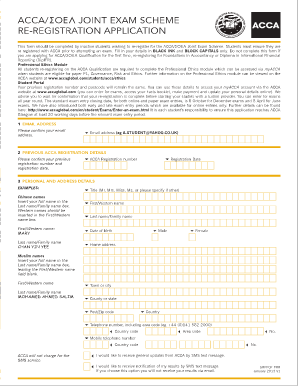
Get Acca 're Registration Fee 2020
How it works
-

Open form follow the instructions
-

Easily sign the form with your finger
-

Send filled & signed form or save
How to fill out the Acca 're Registration Fee 2020 online
This guide provides a straightforward approach to completing the Acca 're Registration Fee 2020 form online. It is designed to assist users from all backgrounds in navigating the form with ease.
Follow the steps to successfully complete the form.
- Click ‘Get Form’ button to obtain the form and open it in the editor.
- Confirm your email address in the designated field. Ensure it is entered correctly to avoid communication issues.
- Provide your previous Acca registration details, including your registration number and the date you first registered.
- Fill in your personal and address details. Use black ink and block capitals only, providing your full name and contact information.
- Attach all relevant documentation including a passport-sized photograph, if required. Ensure your registration number is written on the back of the photograph.
- Specify your method of payment by crossing the appropriate box—either for the re-registration fee or any outstanding balance.
- Review all entries for accuracy before signing and dating your application at the designated sections.
- Save changes, download a copy of the completed form, or print it for submission.
Complete your re-registration application online today to continue your journey with ACCA.
All members and future members pay an annual subscription. This allows us to keep delivering on our purpose; to be a force for public good, creating opportunities for all. Your annual subscription is payable on 1 January each year and we'll send you notification the November before.