Loading
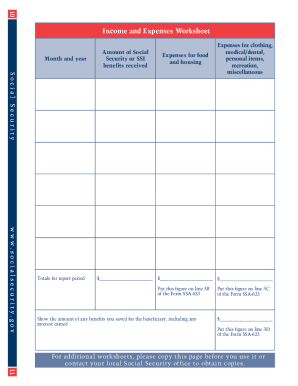
Get Form Omb No 0960 0068
How it works
-

Open form follow the instructions
-

Easily sign the form with your finger
-

Send filled & signed form or save
How to fill out the Form Omb No 0960 0068 online
Filling out the Form Omb No 0960 0068 online is a straightforward process designed to assist users in managing their responsibilities as representative payees. This guide provides a step-by-step approach to help users navigate the form efficiently and effectively.
Follow the steps to fill out the Form Omb No 0960 0068 online.
- Click the ‘Get Form’ button to obtain the form and open it for editing.
- Begin with Section A, which requires you to provide the name and Social Security number of the beneficiary. Ensure the information is accurate to prevent processing delays.
- Proceed to Section B, where you will detail your relationship to the beneficiary. This section establishes your role as the representative payee.
- In Section C, you will indicate how the benefits were used during the reporting period. Include detailed accounts of expenses related to food, housing, and other personal needs of the beneficiary.
- Next, in Section D, report any funds that were saved on behalf of the beneficiary. This should include any interest earned on these funds.
- Review each section for completeness and accuracy. Ensure all information aligns with your financial documentation.
- Once satisfied with the information entered, you can save your changes, download a copy for your records, and print or share the form as needed.
Complete the Form Omb No 0960 0068 online today to ensure you meet your responsibilities as a representative payee.
How do I complete the representative payee forms online? First, get a User ID and password by registering via Business Services Online. Second, use the paper form to get four identifying items to access the online form. Third, complete the online form, using the online edits as needed.