Loading
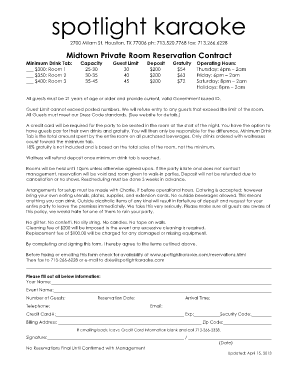
Get How Much Are Drinks At Spotlight Karaoke Form
How it works
-

Open form follow the instructions
-

Easily sign the form with your finger
-

Send filled & signed form or save
How to fill out the How Much Are Drinks At Spotlight Karaoke Form online
This guide will assist you in accurately completing the How Much Are Drinks At Spotlight Karaoke Form online. By following the detailed steps outlined below, you can ensure that your reservation process is smooth and straightforward.
Follow the steps to complete your reservation form with ease.
- Press the ‘Get Form’ button to obtain the form and open it for editing.
- Provide your name in the designated field at the top of the form, ensuring that it is accurate and reflects your booking identity.
- Enter the name of your event in the 'Event Name' field to help identify the occasion.
- Indicate the number of guests by selecting a number from the options available. Ensure this does not exceed the room's guest limit.
- Choose the reservation date by entering it in the ‘Reservation Date’ field, making sure to select a date within available operating hours.
- Fill in your telephone number, ensuring it is a number where you can be reached for any follow-up communication.
- Specify your arrival time, formatted clearly to assist staff in planning for your arrival.
- Provide your email address. This will be essential for receiving confirmation and further details about your reservation.
- Enter your credit card information, including the card number, expiration date, security code, billing address, and zip code. Note that if you choose to email the form back, you should leave credit card details blank and call to provide this information.
- Sign the form and insert the date of signing. Your signature indicates agreement to the terms outlined above.
- Once completed, review all provided information for accuracy. You can then save changes, download, print, or share the form as needed.
Complete your document online today to ensure your reservation is secure and hassle-free.
Choose "Custom dimensions" and enter the recommended size for YouTube watermarks, which is 150 x 150 pixels. Customize your watermark by adding text, shapes, or your logo. You can change the font, color, size, and other design elements to align with your brand.