Loading
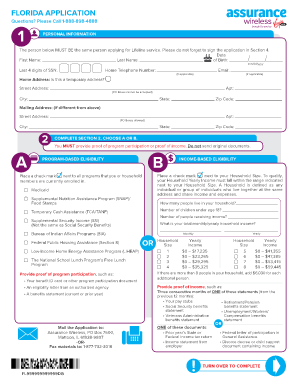
Get Assurance Wireless Application Form
How it works
-

Open form follow the instructions
-

Easily sign the form with your finger
-

Send filled & signed form or save
How to fill out the Assurance Wireless Application Form online
This guide provides a clear and comprehensive approach to completing the Assurance Wireless Application Form. Following these steps will help ensure that your application is filled out accurately and submitted successfully.
Follow the steps to complete the assurance wireless application form.
- Click ‘Get Form’ button to access the Assurance Wireless Application Form and open it in your preferred editor.
- Fill in your personal information in Section 1. Include your date of birth, first name, last name, the last four digits of your Social Security number, home telephone number, and email address (if applicable). Additionally, provide your home address, ensuring it is not a P.O. box.
- Complete Section 2 by selecting either program-based or income-based eligibility. You must provide proof of eligibility according to your selection, but do not send original documents.
- If you choose program-based eligibility, place a check next to each program you or your household members are enrolled in. If you opt for income-based eligibility, indicate your household size and annual income, then provide the requested proof of your income.
- In Section 3, create a six-digit Account PIN that follows the specified guidelines. Also, choose a secret answer for account recovery; this will help secure your application.
- Review the important information about the Lifeline program included in the form. Ensure you are familiar with the terms to understand your responsibilities as an applicant.
- In Section 4, carefully read and check all three statements, then sign and date the application to certify the information is truthful. Make sure to sign in blue or black ink.
- Finally, before submitting your application, double-check that you have provided your date of birth, the last four digits of your Social Security number, attached proof of eligibility, and checked all required statements.
- Once all sections are complete, save your changes. You can then choose to download, print, or share your completed form as needed.
Start your application process today by completing the Assurance Wireless Application Form online.
Related links form
Call Customer Care at 1-888-898-4888. Speak to a representative in your neighborhood. The representative will help you apply. Along with proof of eligibility, you will be required to provide proof of address and identity to qualify for a free Assurance Wireless phone.