Get Axa Ge 42946
How it works
-

Open form follow the instructions
-

Easily sign the form with your finger
-

Send filled & signed form or save
How to fill out the Axa Ge 42946 online
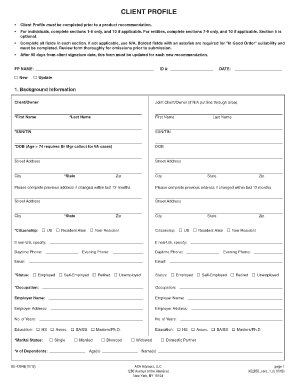
The Axa Ge 42946 document is crucial for collecting client information prior to product recommendations. This guide provides user-friendly instructions for completing the form online, ensuring that all required information is accurately submitted.
Follow the steps to successfully fill out the Axa Ge 42946 form.
- Click ‘Get Form’ button to access the Axa Ge 42946 document and open it for editing.
- Carefully read the instructions provided at the beginning of the form to understand which sections are required based on whether you are an individual or an entity.
- For individuals, fill out sections 1-8 and section 10 if applicable. For entities, complete sections 7-9 and section 10 if necessary.
- In section 1, input your background information. Ensure all fields marked with an asterisk (*) are completed as they are mandatory. If not applicable, write 'N/A'.
- In section 2, provide your financial information, including current holdings and income sources. Ensure to calculate and input your estimated gross annual household income accurately.
- Complete section 3 to detail your insurance coverage, indicating the issuer and policy types as required.
- Fill out section 4 with identification details according to your status and ensure to note down any necessary identification numbers.
- In section 5, include any additional client notes and important considerations to further explain your financial situation.
- Review section 6 to rank your current financial goals according to your priorities and add any additional comments that clarify your objectives.
- Insection 7, specify the product details clearly, including the tax type and amount, ensuring it aligns with your financial goals.
- Complete section 8 regarding additional information and acknowledgments, answering the questions truthfully.
- If applicable, fill out section 9 specifically for entities, ensuring all required fields are complete.
- Finally, review the entire form for completeness and accuracy. Save your changes, download, print, or share the completed document as necessary.
Ensure to complete your Axa Ge 42946 document online today for timely product recommendations.
0:06 14:51 How to Make a VOUCHER in WORD | Create a Gift Voucher - YouTube YouTube Start of suggested clip End of suggested clip And we're going to place 21. In the width. And press enter. And now we can move this anywhere in ourMoreAnd we're going to place 21. In the width. And press enter. And now we can move this anywhere in our document. So we're going to make the background. Black. So select it go to shape format.