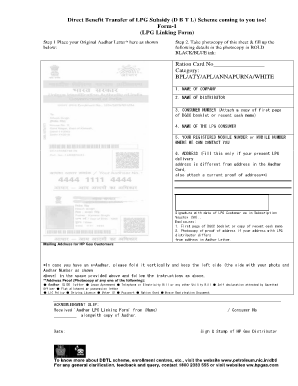
T & fill up the following details in the photocopy in BOLD BLACK/BLUE ink: Ration Card No Category: BPL/ATY/APL/ANNAPURNA/WHITE 1. NAME OF COMPANY 2. NAME OF DISTRIBUTOR 3. CONSUMER NUMBER (Attach a copy of first page of DGCC booklet or recent cash memo) 4. NAME OF THE LPG CONSUMER 5. YOUR REGISTERED MOBILE NUMBER or MOBILE NUMBER WHERE WE CAN CONTACT YOU 6. ADDRESS (Fill this only if your present LPG delivery address is different from address in the Aadhar Card, also attach a.
Open form follow the instructions
Easily sign the form with your finger
Send filled & signed form or save
How to fill out the Aadhar Bank Linkage For Dbtl Scheme Pdf Form online
Filling out the Aadhar Bank Linkage For Dbtl Scheme Pdf Form is an essential step for users seeking to link their Aadhar number with their LPG subsidy. This guide provides a clear and structured approach to ensure a smooth experience in completing the form online.
Follow the steps to successfully complete the form online.
- Click the ‘Get Form’ button to obtain the form and open it in the editor.
- Carefully place your original Aadhar letter as indicated in the form. If you have an e-Aadhar, fold it as instructed and place it in the designated area.
- Make a photocopy of the form’s first page and fill in the required details using bold black or blue ink. Include your Ration Card Number and select the appropriate category: BPL, ATY, APL, Annapurna, or White.
- Provide the name of the LPG company and the name of your distributor.
- Enter your consumer number, attaching a copy of the first page of the DGCC booklet or a recent cash memo.
- Fill in the name of the LPG consumer and provide your registered mobile number or an alternative contact number.
- If your current LPG delivery address differs from the one on your Aadhar card, fill in the new address and attach a current proof of address.
- Sign and date the form as the LPG customer, ensuring it matches your Subscription Voucher.
- Gather the required enclosures: a copy of the first page of the DGCC booklet or recent cash memo and a photocopy of the address proof, if applicable.
- After completing the form and gathering all necessary documents, save your changes, download, print, or share the completed form as needed.
Complete your Aadhar Bank Linkage For Dbtl Scheme form online today!
Experience a faster way to fill out and sign forms on the web. Access the most extensive library of templates available.
Related content
Jul 22, 2019 — Reasons for not receiving DBT included (i) not having a bank account...
Mar 31, 2019 — vehicle of communication and Aadhaar as unique biometric identifier have...
Get answers to your most pressing questions about US Legal Forms API.
How do I link my Aadhar card with my DBT enabled bank account?
This account will be seeded with NPCI-mapper by the Bank to operate as DBT enabled account. To receive DBT benefits in your bank account, please visit the bank branch where you have opened the account and request the bank to link your Aadhaar with your account by filling up the mandate and consent form of the bank.
How to fill bank account linkage application form?
Linking Bank Account with Aadhaar in the Bank Step 1: Fill the bank account Aadhaar linking application form. ... Step 2: Mention your bank account details as well as your Aadhaar number properly. Step 3: Attach a self-attested photocopy of your Aadhaar card with the form.
How to fill Aadhar bank link form?
The steps that were previously followed and can still be followed (if you choose to) to link your Aadhaar and your bank account are: Step 1: Visit your bank's nearest branch. Step 2: Carry your Aadhaar or your e-Aadhaar. Step 3: Fill in a letter of request. Step 4: Submit the form along with a copy of your Aadhaar.
How do I link my Aadhar card to NPCI seeding?
Link Aadhar and Bank Account to NPCI Step 1: Visit the official website of NPCI. Step 2: Click on 'Aadhaar Seeding Process' option. Step 3: Click on 'Click Here' option, under 'Aadhaar Seeding Process' option. Step 4: The Aadhar seeding form will be displayed in a new tab.
How do I check my DBT linked account status?
If you have availed SMS alerts facility from the concerned bank where your DBT account is opened, then the bank will send out SMS alerts when you get DBT funds in account. Alternatively, you can also check your account balance using ATM, microATM/ Bank Mitra, internet/mobile banking or through phone-banking.
How do I activate my bank linking status?
Through UIDAI (Aadhaar) website In the form that opens, Enter your 12 digit Aadhaar number or 16 digit Virtual ID and Enter Security Code (Type the character you see in the picture vsible near the text box). Click "Send OTP". ... Submit the OTP to check Aadhaar bank linking status with bank.
How can I know my bank account linked with Aadhar card?
Under the Aadhaar Services section, look for the option titled “Check Aadhaar & Bank Account Linking Status” or a similar option that indicates the linking status of your Aadhaar with a bank account.
Use professional pre-built templates to fill in and sign documents online faster. Get access to thousands of forms.
If you believe that this page should be taken down, please follow our DMCA take down process here.