Loading
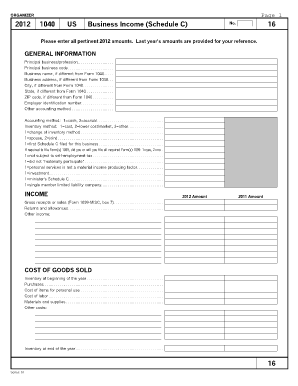
Get Business Income Schedule C Organizer
How it works
-

Open form follow the instructions
-

Easily sign the form with your finger
-

Send filled & signed form or save
How to fill out the Business Income Schedule C Organizer online
This guide provides a comprehensive overview of how to complete the Business Income Schedule C Organizer online. Whether you are a seasoned business owner or new to this form, this step-by-step approach will help you fill it out accurately and efficiently.
Follow the steps to complete the Business Income Schedule C Organizer online.
- Click ‘Get Form’ button to obtain the form and open it in the editor.
- Begin by filling out the general information section. This includes your principal business or profession, principal business code, business name, address details, and employer identification number.
- Indicate your accounting method by selecting either cash or accrual. Provide your inventory method and whether there was a change in inventory method.
- Complete the income section by entering your gross receipts or sales, returns and allowances, and any other income.
- Fill in the cost of goods sold section. Start by entering the inventory at the beginning of the year, purchases made during the year, costs of items for personal use, and costs of labor and materials.
- Navigate to the expenses section. Here, you will categorize your expenses including accounting, advertising, car and truck expenses, and any other operating costs.
- Ensure you record all relevant expenses and proceed to summarize your totals.
- Finally, after ensuring all information is accurate, you can save changes, download, print, or share the completed form.
Complete the Business Income Schedule C Organizer online today!
Step 1: Gather Information. Step 2: Calculate Gross Profit and Income. Step 3: Include Your Business Expenses. Step 4: Include Other Expenses and Information. Step 5: Calculate Your Net Income. And If You Have a Business Loss.