Loading
Get Form 50 164
How it works
-

Open form follow the instructions
-

Easily sign the form with your finger
-

Send filled & signed form or save
How to fill out the Form 50 164 online
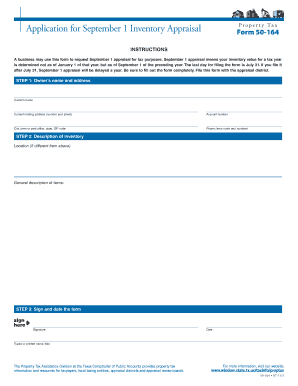
This guide provides a clear and supportive approach to completing Form 50 164 online, which requests a September 1 appraisal for tax purposes. Follow the instructions carefully to ensure your form is filled out correctly and submitted on time.
Follow the steps to fill out Form 50 164 online effectively.
- Click ‘Get Form’ button to obtain the form and open it in the editor.
- Fill in the owner’s name and current mailing address. Include the account number, city or town, state, and ZIP code in the designated fields.
- Provide a detailed description of the inventory location, especially if it differs from your mailing address. Include a general description of the items. Be thorough to ensure accurate appraisal.
- Sign and date the form in the specified area. Ensure that your typed or printed name and title are completed to validate the form.
- Review all the information you have entered for accuracy and completeness before proceeding. Any errors may delay the appraisal process.
- Once you have confirmed that all information is accurate, you can save changes, download, print, or share the form as needed.
Complete your Form 50 164 online today to ensure timely processing of your appraisal request.
Related links form
The 10% increase is cumulative. Therefore, the maximum increase is 10% times the number of years since the property was last appraised.