Loading
Get Xxx3pd Form
How it works
-

Open form follow the instructions
-

Easily sign the form with your finger
-

Send filled & signed form or save
How to fill out the Xxx3pd Form online
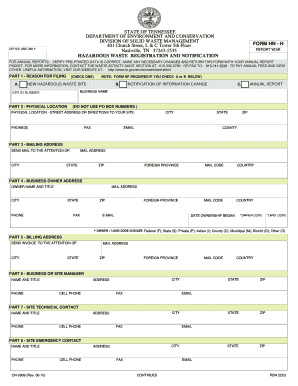
This guide provides a step-by-step approach for filling out the Xxx3pd Form online. Whether you are filing a new hazardous waste site registration or updating your information, you will find clear directions to help you complete the form with ease.
Follow the steps to successfully complete the Xxx3pd Form online.
- Press the ‘Get Form’ button to access the Xxx3pd Form and open it in the editing interface.
- In Part 1, select the reason for filing by checking the appropriate box: New hazardous waste site, Notification of information change, or Annual report. Ensure you have the necessary form if you're selecting options A or B.
- Complete Part 2 with the physical location details. This includes the street address (avoid using P.O. Box numbers), city, state, zip code, county, phone number, fax number, and email.
- Fill out Part 3 with the mailing address information, ensuring you include the attention of, city, state, ZIP code, and country details.
- In Part 4, provide the business owner's address. Be sure to include the owner's name and title, contact information, and the date ownership began.
- Enter billing address information in Part 5, including name to whom the invoice should be sent.
- Complete Part 6 with the business or site manager's details, including their name, title, and contact information.
- Move to Part 7 and provide the site technical contact's information.
- In Part 8, fill in the site emergency contact details.
- Complete Part 9 by checking off any applicable site-specific information such as water supply or waste types managed.
- In Part 10, enter the NAICS code that best identifies your industrial classification. Additional information is available if needed.
- Proceed to Part 11 and check any applicable other waste activity occurring at the site.
- Finally, return your completed form by mailing it to the designated address in Part 12.
- In Part 13, certify the document by signing and providing the necessary details of the authorized representative.
Complete your Xxx3pd Form online today to ensure proper compliance and timely processing.
Related links form
Change an existing hyperlink Right-click anywhere on the link and, on the shortcut menu, click Edit Hyperlink. In the Edit Hyperlink dialog, select the text in the Text to display box. Type the text you want to use for the link, and then click OK.
Industry-leading security and compliance
US Legal Forms protects your data by complying with industry-specific security standards.
-
In businnes since 199725+ years providing professional legal documents.
-
Accredited businessGuarantees that a business meets BBB accreditation standards in the US and Canada.
-
Secured by BraintreeValidated Level 1 PCI DSS compliant payment gateway that accepts most major credit and debit card brands from across the globe.