Loading
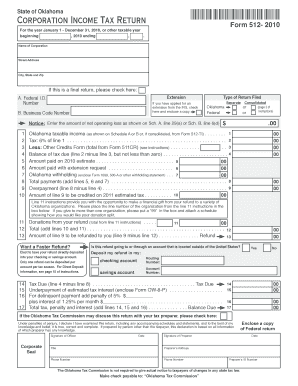
Get Oklahoma Corporate Tax Forms 512
How it works
-

Open form follow the instructions
-

Easily sign the form with your finger
-

Send filled & signed form or save
How to fill out the Oklahoma Corporate Tax Forms 512 online
This guide provides step-by-step instructions for completing the Oklahoma Corporate Tax Forms 512 online. By following these detailed instructions, users can efficiently fill out the form with confidence.
Follow the steps to successfully complete your corporate tax filing.
- Click ‘Get Form’ button to obtain the form and open it in the editor.
- Begin with entering the corporation's name and address in the designated fields. Ensure accuracy to avoid processing delays.
- Provide the Federal Identification Number (FEIN) and Business Code Number where indicated. This information is essential for identification and processing.
- Choose the type of return being filed: Separate or Consolidated. Mark the appropriate options to clarify your filing status.
- Report Oklahoma taxable income as calculated in Schedule A or B. Make sure to verify the figures for accuracy.
- Calculate the tax at the rate of 6% of Oklahoma taxable income. Enter this amount in the tax line.
- Deduct any allowable credits totals from Form 511CR from the calculated tax. This will help in reducing the overall tax liability.
- Enter the total payments made during the year, including estimate payments and withholdings. This step is critical for ensuring proper credit for payments made.
- Complete the section for any donations from your refund, if applicable, and provide the respective line numbers.
- Finally, review all entries for accuracy, save changes, and proceed with downloading or printing the completed form. Ensure to keep a copy for your records.
Start completing your Oklahoma Corporate Tax Form 512 online today for an efficient tax filing experience.
Related links form
To access online forms, select "Individuals" at the top of the IRS website and then the "Forms and Publications" link located on the left hand side of the page. You will then see a list of printable forms, including the 1040, 1040-EZ, 4868 form for an extension of time and Schedule A for itemized deductions.