Loading
Get North Dakota Form 500
How it works
-

Open form follow the instructions
-

Easily sign the form with your finger
-

Send filled & signed form or save
How to fill out the North Dakota Form 500 online
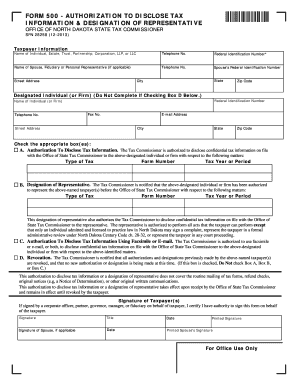
Filling out the North Dakota Form 500 online is a straightforward process that allows taxpayers to authorize the disclosure of tax information or designate a representative. This guide is designed to help users navigate each section clearly and efficiently.
Follow the steps to complete the form successfully.
- Click ‘Get Form’ button to obtain the form and open it in the editor.
- Begin with the taxpayer information section. Enter the name of the individual, estate, trust, partnership, corporation, or LLC, along with the corresponding telephone number and federal identification number. If applicable, include the name and telephone number of the spouse, fiduciary, or personal representative.
- Next, in the designated individual or firm section, provide their name, federal identification number, and contact details, including telephone number, fax number, e-mail address, and mailing address.
- Check the appropriate box(es) based on your needs: Box A for authorization to disclose tax information, Box B for designation of a representative, Box C for authorization to use facsimile or e-mail, and Box D to revoke previous authorizations.
- If limiting the authorization or designation, specify the type of tax, form number, and tax year or period. Attach an additional sheet if more space is needed.
- Complete the signature section. Ensure that the individual who signs has the authority to act on behalf of the taxpayer. If applicable, include the signature of the spouse and date of signing.
Complete your North Dakota Form 500 online today for a seamless process.
Related links form
North Dakota (ND) State Payroll Taxes in 2023 The tax rates range from 1.1% to 2.9%. Only employees who earn more than $433,200 per year will hit the highest tax bracket.