Loading
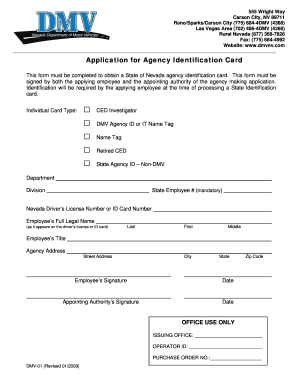
Get Dmv01 - Application For Agency Identification Card - Dmv Nv
How it works
-

Open form follow the instructions
-

Easily sign the form with your finger
-

Send filled & signed form or save
How to fill out the DMV01 - Application For Agency Identification Card - Dmv Nv online
Filling out the DMV01 form is crucial for anyone seeking a State of Nevada agency identification card. This guide provides a detailed, step-by-step approach to help you navigate the online completion of the application with ease and clarity.
Follow the steps to successfully complete your application online.
- Click ‘Get Form’ button to obtain the form and open it in the editor.
- Indicate the individual card type by selecting one of the provided options, which include CED Investigator, DMV Agency ID or IT Name Tag, Name Tag, Retired CED, or State Agency ID – Non-DMV.
- Fill out the department and division fields as required by your agency.
- Enter your mandatory State Employee Number in the designated field.
- Provide your Nevada Driver’s License Number or ID Card Number in the corresponding field.
- Input your full legal name as it appears on your driver’s license or ID card. Ensure to complete the last, first, and middle name sections accurately.
- Specify your employee title in the provided field.
- Complete the agency address section, ensuring to fill in street address, city, state, and zip code appropriately.
- Sign and date the form in the Employee’s Signature section.
- The appointing authority should then sign and date the form in the designated section.
- Once all sections are filled, save the changes, and then you can download, print, or share the form as required.
Complete your DMV01 application online now to obtain your agency identification card efficiently.
Related links form
SP Procedure For Processing Requests For Reasonable Accommodation Under ADAada Final Sp.doc
Colorado State Board Of Land Commissioners Request For Consent ... - Trustlands State Co
Level I Accreditation Registration Form - Colorado Department Of ...
The SASL Chemical Hygiene Plan - College Of Liberal Arts And ...
Nevada has three sets of requirements for proof of identity, including a Real ID license or ID card that meets federal requirements, a standard Nevada license/ID or a Driver Authorization Card (DAC).