Loading
Get State Form 47
How it works
-

Open form follow the instructions
-

Easily sign the form with your finger
-

Send filled & signed form or save
How to fill out the State Form 47 online
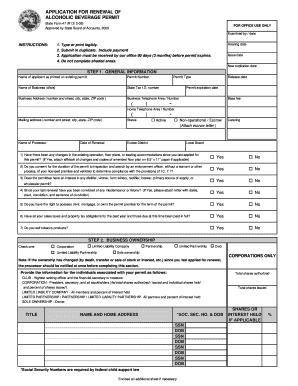
This guide provides a comprehensive overview of how to complete the State Form 47 for the renewal of your alcoholic beverage permit online. Whether you are experienced with digital forms or are new to the process, these instructions will assist you in successfully filling out the necessary information.
Follow the steps to complete State Form 47 online.
- Click ‘Get Form’ button to access the form and open it for editing.
- Begin with Step 1: General Information. Here, input the name of the applicant as it appears on the existing permit, the permit number, business name, and state tax ID number. Fill in the business address and telephone number as well as the permit type, expiration date, and fee details.
- In Step 2: Business Ownership, select the appropriate type of business ownership from the provided options. If the ownership structure has changed since your last renewal, ensure to inform the processor before filling out this section.
- Move to Step 3: Annual Food Sales, if applicable. Note the required time period for your food sales report, providing the start and end dates along with gross sales figures for both food and alcoholic beverages.
- Complete Step 4: Operation Information. Answer questions regarding any current contracts to sell the business and confirm server training. Verify whether you manage the premises and check the relevant qualifications for the managers listed.
- Proceed to Step 5: Affidavit of Applicant. Here, you'll certify that all information in your application is correct. Ensure to print your name, sign, and date the form.
- If applicable, complete Step 6: Affidavit of Preparer. This includes certifying that the application has been reviewed and is complete. The preparer must sign and date the form.
- Finally, Step 7: Fee. Determine the applicable fee based on the type of permit and ensure payment is included before submission. Submit the form in duplicate to the specified address.
- After completing the form, you can save your changes, download it for your records, print a copy for submission, or share it as needed.
Complete your State Form 47 online today to ensure your alcoholic beverage permit is renewed without delay.
Specifying the Date and Time Format to Use in Log Entries. By default, log entries in all logs shown in Integration Server Administrator use the format yyyy-mm-dd hh:mm:ss. You can change this format to any other format that is supported by the Java class java.