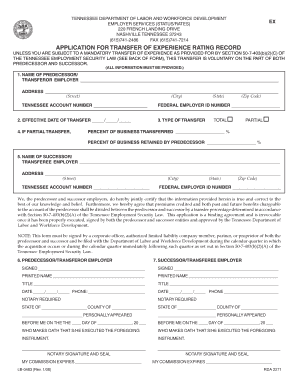
TENNESSEE DEPARTMENT OF LABOR AND WORKFORCE DEVELOPMENT EMPLOYER SERVICES (STATUS/RATES) 220 FRENCH LANDING DRIVE NASHVILLE TENNESSEE 37243 (615)741-2486 FAX (615)741-7214 EX APPLICATION FOR TRANSFER.
Open form follow the instructions
Easily sign the form with your finger
Send filled & signed form or save
How to fill out the Tn Form Lb 0483 online
The Tn Form Lb 0483 is essential for employers in Tennessee looking to transfer their experience rating record. This guide provides a clear, step-by-step approach to filling out the form online, ensuring accurate completion for both predecessor and successor employers.
Follow the steps to successfully complete the Tn Form Lb 0483.
- Press the ‘Get Form’ button to acquire the form and open it in your preferred online editor.
- Enter the name of the predecessor or transferor employer in the designated field.
- Fill in the complete address of the predecessor employer, including street, city, state, and zip code.
- Provide the Tennessee account number of the predecessor employer.
- Indicate the effective date of the transfer by filling out the date fields.
- Select the type of transfer by marking either 'Total' or 'Partial.'
- If it is a partial transfer, enter the federal employer ID number of the predecessor employer.
- For a partial transfer, specify the percentage of business transferred and the percentage retained by the predecessor.
- Enter the name of the successor or transferee employer and their complete address.
- Fill in the Tennessee account number and federal employer ID number for the successor employer.
- Both employers must certify the accuracy of the information by signing and printing their names, titles, and dates.
- Complete the required notary section, ensuring both parties have a notary public present.
- After completing the form, save your changes, and if necessary, download, print, or share the form as required.
Begin filling out your Tn Form Lb 0483 online today to ensure a smooth transfer process.
Experience a faster way to fill out and sign forms on the web. Access the most extensive library of templates available.
Related content
LB-0483 (Rev. 1/08) ... NOTE: This form must be signed by a corporate officer, authorized...
final electronic copy of this thesis for form and content and recommend that it be...
This is a major revision of and makes obsolete 123-0483-1. Significant ... A form for...
Get answers to your most pressing questions about US Legal Forms API.
How do I pay my unemployment tax in Tennessee?
Paying Unemployment Taxes The payment of premiums may be made by Automated Clearing House (ACH) Debit through the TNPAWS system or by Automated Clearing House (ACH) Credit (see Paying Premiums Electronically by Automated Clearing House (ACH) Credit.)
How do I register my business with unemployment in Tennessee?
Register as an Employer on Jobs4TN.gov Go to Jobs4TN.gov. Click "Not Registered Yet?" under the sign in box. Under "Option 3 - Create a User Account", choose Employer. Follow the prompts by providing your organization's: Federal Employer ID Number (EIN) / Federal Tax ID (FEID) UI Employer Account Number.
How do I get my unemployment tax form in TN?
Digital and print 1099-G documentation will be available by January 31, 2023. Log into your Jobs4TN.gov account. Click on the More Unemployment Services option under Unemployment Services section. Click on From 1099-G Information.
How do I get a Tennessee SUI number?
If you are liable for unemployment insurance premiums in Tennessee, you will be assigned an eight digit employer account number (e.g., 0000-000 0). Applications may be obtained online or by calling your local Employer Accounts Office or by calling toll free (844) 224-5818 and press option 2 for Employer Taxes.
Which employer is responsible for unemployment benefits in Tennessee?
The Tennessee Department of Labor and Workforce Development's Division of Employment Security administers the unemployment insurance program in Tennessee.
Does Tennessee have Sui?
Tennessee uses the IRS's 20-factor test to determine who is an employee for state unemployment insurance (SUI) tax purposes. See The IRS 20-Factor Test of Employment Status.
How do I find my Tennessee tax employer account number?
You may look up your professional privilege tax account ID by visiting our tax filing website, the Tennessee Taxpayer Access Point (TNTAP). Click on the "Professional Privilege Account ID" link under the "Look Up Information & Requests" heading.
Does Tennessee require a separation notice?
Rule 0800-09-01-. 02 of the Rules and Regulations of the Tennessee Employment Security Law, requires all employers to furnish each separated employee with a Separation Notice, LB-0489, within 24 hours of the employee's separation from employment.
Use professional pre-built templates to fill in and sign documents online faster. Get access to thousands of forms.
If you believe that this page should be taken down, please follow our DMCA take down process here.