Loading
Get E-verify Trademark License - Uscis - Uscis
How it works
-

Open form follow the instructions
-

Easily sign the form with your finger
-

Send filled & signed form or save
How to fill out the E-Verify Trademark License - USCIS - Uscis online
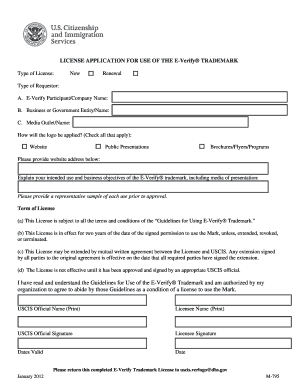
Completing the E-Verify Trademark License application is an essential step for those seeking permission to use the E-Verify trademark. This guide will provide clear, step-by-step instructions on how to efficiently fill out this form online.
Follow the steps to successfully complete the E-Verify Trademark License form.
- Click ‘Get Form’ button to obtain the form and open it in your preferred document editor.
- Indicate the type of license you are applying for by selecting either 'New' or 'Renewal'.
- Select the type of requestor from the given options, which includes E-Verify Participant, Business or Government Entity, or Media Outlet.
- Describe how the E-Verify® logo will be applied by checking all applicable options such as website, public presentations, or brochures/flyers/programs.
- Provide your website address where the logo will be displayed if applicable.
- Explain your intended use and business objectives of the E-Verify® trademark, ensuring to include all media of presentation as instructed.
- Attach a representative sample of each intended use of the trademark before submission.
- Review the term of the license, which states it is effective for two years unless extended or terminated.
- Both the Licensee and the appropriate USCIS official must sign the document, including printing their names.
- Once completed, save the changes to your document. Download, print, or share the form as required.
Complete your E-Verify Trademark License application online and ensure compliance with the guidelines.
Select the row that is underneath the row where you want the page to break. Select the column that is to the right of the column where you want the page to break. On the Layout tab, under Page Setup, click Breaks, and then click Insert Page Break.