Loading
Get Kyc Crdb
How it works
-

Open form follow the instructions
-

Easily sign the form with your finger
-

Send filled & signed form or save
How to fill out the Kyc Crdb online
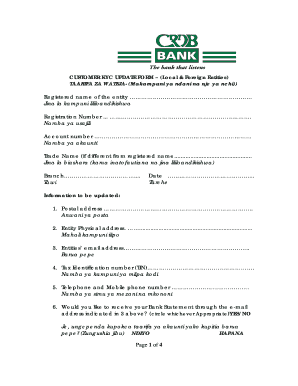
Completing the Kyc Crdb form online is essential for updating your customer information with CRDB Bank. This guide will walk you through each section of the form, ensuring you provide the necessary information accurately and efficiently.
Follow the steps to complete the Kyc Crdb form online.
- Click ‘Get Form’ button to obtain the Kyc Crdb form and open it for editing.
- Fill in the registered name of the entity in the designated field along with the registration number and account number as required.
- Provide the trade name if it differs from the registered name and select the relevant branch from the list.
- Enter the date of the information update in the provided space.
- Update your postal address and physical address of the entity accurately.
- Include the entity's email address and Tax Identification Number (TIN) in the appropriate fields.
- Input both telephone and mobile phone numbers as required.
- Indicate whether you would like to receive your bank statement through the provided email address by circling 'YES' or 'NO'.
- Provide details of individuals operating the account on behalf of the entity, including their full names, date and place of birth, residential address, TIN, and contact numbers.
- List the details of owners holding 5% or more of the voting rights, including their full names, date and place of birth, registered name, registration number, and address.
- Provide the residential address and contact details of the directors, individuals, or entities holding 5% or more of the entity.
- Collectively gather the signature(s) from account signatories, including their name, signature, and thumb print.
- Attach necessary documents for proof of identity and address, ensuring you include either TIN, passport, or other acceptable documents.
- For users with the need for official validation, fields for receiving officer and supervisor information may be completed.
- Once all sections are completed accurately, save your changes, download the form, print it, or share it as required.
Complete your Kyc Crdb form online today for seamless updates.
A bullet point is a symbol that is used in writing to introduce an item in a list. A commonly used symbol to represent a bullet point is a centered dot ( • ), but many different symbols and characters can be used in bullet point lists.