Loading
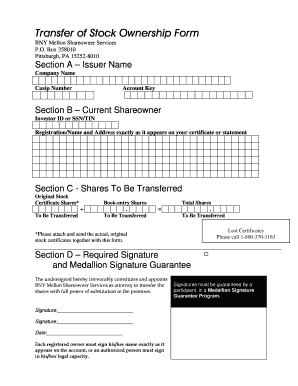
Get Transfer Of Stock Ownership Form
How it works
-

Open form follow the instructions
-

Easily sign the form with your finger
-

Send filled & signed form or save
How to fill out the Transfer Of Stock Ownership Form online
This guide provides a clear and supportive approach to completing the Transfer Of Stock Ownership Form online. Whether you are new to transferring stock ownership or need a quick refresher, these steps will help you navigate the process with ease.
Follow the steps to successfully complete the form
- Click ‘Get Form’ button to obtain the form and open it in your preferred online editor.
- In Section A, enter the issuer name, which is the company name, and include the CUSIP number along with your account key.
- Proceed to Section B and provide your current shareowner information. Enter your investor ID or social security number/tax identification number, and ensure that you write the registration name and address exactly as they appear on your stock certificate or statement.
- In Section C, specify the shares to be transferred. Indicate the original stock certificate shares you are transferring and the number of book-entry shares, then calculate and enter the total shares to be transferred. If there are lost certificates, note that you can call 1-800-370-1163 for assistance.
- For Section D, you must sign the form. Each registered owner must sign their name exactly as it appears on the account, or an authorized person must sign in their legal capacity. Additionally, ensure that all signatures are guaranteed by a participant in a Medallion Signature Guarantee Program.
- In Section E, select the account type for the new shareowners. Check the appropriate box — individual, joint, custodial, trust, estate, corporation, or other. If necessary, use additional copies of this page to divide shares amongst multiple owners.
- Next, in Section F, enter the total shares to be transferred to the new owner's account and provide the registration name and address of the new owner.
- Finally, complete Section G, which is the Taxpayer ID Certification (Substitute Form W-9). New shareowners should provide their taxpayer identification number and sign the certification. Ensure you follow the instructions carefully, as failure to provide accurate information may subject the account to backup withholding.
- After filling out all sections, review your entries for accuracy. Save any changes, then choose to download, print, or share the completed form as required.
Start filling out your Transfer Of Stock Ownership Form online today for a seamless transfer experience.
A stock transfer form (also known as form J30) is the standard document required for the transfer of shares in the UK. It contains details of both the seller and buyer of the shares, the type and number of shares being transferred and the amount paid by the buyer.