Loading
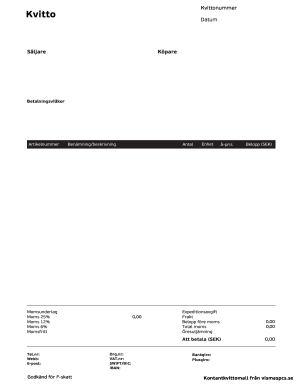
Get Kvitto Mall
How it works
-

Open form follow the instructions
-

Easily sign the form with your finger
-

Send filled & signed form or save
How to fill out the Kvitto Mall online
Filling out the Kvitto Mall form online is a straightforward process that allows users to document transactions effectively. This guide provides step-by-step instructions on how to accurately complete each section of the Kvitto Mall.
Follow the steps to complete the Kvitto Mall form online.
- Click ‘Get Form’ button to access the Kvitto Mall and open it in your preferred editor.
- Enter the 'Datum' field with the current date of the transaction. This is vital for record-keeping.
- In the 'Säljare' section, input the name of the seller or business providing the goods or services.
- Fill in the 'Köpare' field with the name of the buyer. It is important for identifying the parties involved.
- Specify the 'Betalningsvillkor' to indicate the payment terms agreed upon by the buyer and seller.
- Input the 'Artikelnummer' for each item sold. This helps in item identification and inventory management.
- In the 'Benämning/beskrivning' field, provide a thorough description of the items or services purchased.
- Complete the 'Antal' section by indicating the quantity of each item.
- Fill in the 'Enhet' field to specify the unit of measure (e.g., pieces, kilograms).
- Add the 'À-pris' which represents the price per unit for each listed item.
- The 'Moms 6%' section should automatically calculate the applicable sales tax amount based on the total.
- The 'Att betala (SEK)' field will display the total amount due once all relevant entries have been made.
- Provide your contact details in the Tel.nr, Webb, and E-post fields for follow-up communications.
- Indicate if you are 'Godkänd för F-skatt', signifying that you are registered for tax.
- Complete ‘Belopp (SEK)’ with the grand total once all items and taxes are accounted.
- Fill in the Org.nr, VAT.nr, SWIFT/BIC, and IBAN fields as applicable for corporate transactions.
- Lastly, ensure that any relevant bank information, such as Bankgiro or Plusgiro, is accurately entered.
- Once all fields are completed, you can save changes, download, print, or share the Kvitto Mall as needed.
Complete your Kvitto Mall form online today for seamless record-keeping.
How to resize a PDF online: To start, drop your PDF file or upload it from your device or your cloud storage service. Select the size of your document in the drop-down menu. If you choose custom size, you need to enter the dimensions for height and width, in inches or millimeters. Click on the Resize button.