Loading
Get Baker Hughes Payroll Formxls - Southernfederalcu
How it works
-

Open form follow the instructions
-

Easily sign the form with your finger
-

Send filled & signed form or save
How to fill out the Baker Hughes Payroll Formxls - Southernfederalcu online
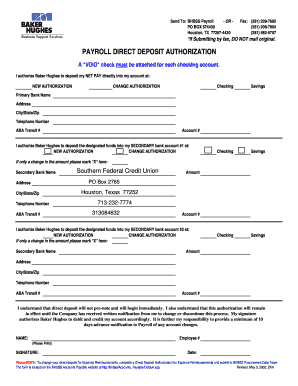
Filling out the Baker Hughes Payroll Formxls - Southernfederalcu accurately is crucial for ensuring timely and correct payroll processing. This guide provides step-by-step instructions on how to complete the form online, helping users navigate its components with ease.
Follow the steps to complete your payroll form online.
- Click ‘Get Form’ button to obtain the form and open it in the editor.
- Begin by reviewing the payroll direct deposit authorization section. This section allows you to set up direct deposits into your checking or savings accounts.
- Indicate whether this is a new authorization or a change authorization by selecting the corresponding option.
- For your primary bank account, enter the bank name, address, city/state/zip code, telephone number, ABA transit number, and account number. Ensure that a 'VOID' check is attached for verification.
- If you have secondary bank accounts, repeat step 4 by providing the required information for each secondary account. Mark whether it is a new or change authorization.
- If applicable, indicate any changes in the deposit amounts by marking 'X' in the designated area.
- Review the statement about the authorization remaining in effect until modified or canceled. Your signature and date are required to finalize the submission.
- Once all fields are completed, you may save changes, download, print, or share the form as needed.
Take the next step toward hassle-free payroll management by completing your Baker Hughes Payroll Form online today.