Loading
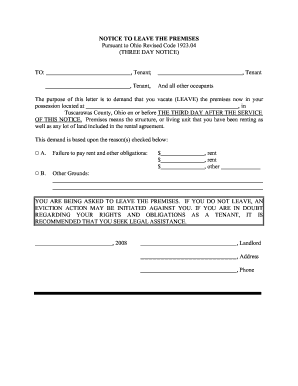
Get Notice To Leave Premises Ohio
How it works
-

Open form follow the instructions
-

Easily sign the form with your finger
-

Send filled & signed form or save
How to fill out the Notice To Leave Premises Ohio online
In Ohio, the Notice To Leave Premises is an essential document for landlords seeking to evict tenants. This guide provides a clear step-by-step process for filling out this notice online, ensuring users complete the form accurately and effectively.
Follow the steps to complete your Notice To Leave Premises.
- Click the ‘Get Form’ button to access the document. This will allow you to open and edit the Notice To Leave Premises form in the online editor.
- Fill in the tenant's full name. Ensure that all tenants and occupants are accurately listed to avoid any confusion or legal issues.
- Enter the specific address of the premises from which the tenant is being asked to vacate. This must include the full address to ensure clear communication.
- In the designated area, indicate the date by which the tenant must leave. This should be specified as the third day after the notice is served.
- Select the applicable reason for the eviction by checking the appropriate box. Choose 'Failure to pay rent and other obligations' or 'Other Grounds' and provide necessary details, such as amounts owed.
- Include the landlord’s name, address, and phone number at the bottom of the form. This information is important for any follow-up communication.
- Review all the entries for accuracy. Make sure that each section is complete and correctly filled out.
- Once the form is finalized, you may save your changes, download, print, or share the completed document according to your needs.
Complete your Notice To Leave Premises online today to ensure proper documentation and legal compliance.
If someone leaves his or personal property in your home for more than thirty (30) days, it is normally not considered abandoned and is not now the property of the owner of the home.