Loading
Form preview
  • US Legal Forms
  • Form Library
  • More Forms
  • More Uncategorized Forms
  • Zenith Bank Dispense Error Form

Get Zenith Bank Dispense Error Form

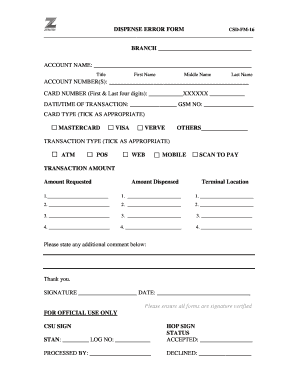
DISPENSE ERROR FORM CSDFM16 BRANCH ACCOUNT NAME: TitleFirst NameMiddle NameLast NameACCOUNT NUMBER(S): CARD NUMBER (First & Last four digits): XXXXXX DATE/TIME OF TRANSACTION: GSM NO: CARD TYPE.

How it works

  1. Open form

    Open form follow the instructions

  2. Easily sign form

    Easily sign the form with your finger

  3. Share form

    Send filled & signed form or save

How to fill out the Zenith Bank Dispense Error Form online

Filling out the Zenith Bank Dispense Error Form is crucial for reporting any discrepancies encountered during transactions. This guide provides clear, step-by-step instructions to help users complete the form online efficiently.

Follow the steps to successfully complete the form online.

  1. Click ‘Get Form’ button to acquire the form and open it in the editor.
  2. Begin by entering the name of the branch where the transaction occurred in the designated field.
  3. Fill out the account name section with your full name, including title, first name, middle name, and last name.
  4. Record your account number(s) in the provided space.
  5. Input the first and last four digits of your card number in the appropriate fields.
  6. Specify the date and time of the transaction along with your GSM number.
  7. Select the card type by ticking the appropriate option (Mastercard, Visa, Verve, or Others).
  8. Indicate the transaction type by selecting one from the available options (ATM, POS, Web, Mobile).
  9. Fill in the transaction amount for each instance where a dispense error occurred, entering amounts for both requested and dispensed.
  10. If there are additional comments regarding the transaction, write them in the designated space.
  11. Provide the terminal location information if applicable.
  12. Finally, sign and date the form to confirm validity. Ensure all fields are correctly completed before submission.

Complete your documents online for a smooth and efficient process.

Get form

Experience a faster way to fill out and sign forms on the web. Access the most extensive library of templates available.
Get form

Related content

New LAA - Secunda Ext 24.doc - SEC.gov
(3) Absa Bank Limited (acting through its Corporate and Investment Banking ... "Accession...
Learn more
Effect of Information and Communication ......
This is as a result of the highly inclined ICT products of Zenith Bank Limited as...
Learn more
2016 RAM Commercial ProMaster Owner's Manual...
related gauges are not working, the Occupant Restraint. Controller ... bly, depending on...
Learn more

Related links form

Chapter 1164 H - Sos State Tx Section Reference: Section 66 - Sos State Tx Capitol Grounds Maintenance Services Addendum #1.docx - Tspb State Tx Region 6 States - Environmental Protection Agency

Questions & Answers

Get answers to your most pressing questions about US Legal Forms API.

Contact support

The partial filling of a prescription for a drug listed in Schedule II is permissible if the pharmacist is unable to supply the full quantity called for in a written or emergency oral prescription, and he makes a notation of the quantity supplied on the face of the written prescription.

From time to time in life and business, we find ourselves needing a little or a lot more money than we have to meet certain pressing financial goals. At Zenith Bank our loan offerings provide a fall-back position to secure the funds you need.

- Provide the Call Center agent with details of the erroneous transfer (i.e. Bank name amount, account name/number, transaction date and time) The bank will contact the beneficiary's bank to confirm the requirements necessary for reversal of the transaction and inform you of same.

Zenith Bank Plc has become the first Nigerian bank to successfully integrate and launch Unstructured Supplementary Service Data (USSD) payments on Point of Sales (USSD on POS), enabling customers to pay for goods and services via POS terminals in merchant locations or on ecommerce websites without the use of cards.

The Zenith Bank loan code is *966#. Dial the number and follow the prompts. This option makes the Zenith Bank easy loan literally easy. You can check out this post for other USSD code for loans in Nigeria.

What is a Dispense Error? It is an error that occurs when your account is debited for a transaction and value is not received, EITHER: ... Cash is not dispensed from the ATM but the exact amount has been debited from your account.

Log on to internet banking with your User ID and Password. Click Cards Click Dispense Error Select the account and the channel on which transaction occurred. Complete the displayed form with details of unsuccessful transaction. Provide answer to your secret question. Click Continue Click Submit

Utility bill to verify your address. A valid ID. 2 passport photos.

Utility bill to verify your address. A valid ID. 2 passport photos.

What is an ATM dispense error? An ATM dispense error occurs when your account has been debited for a certain sum of money but an equivalent sum of cash was not dispensed by an ATM.

Get This Form Now!

Use professional pre-built templates to fill in and sign documents online faster. Get access to thousands of forms.
Get form
If you believe that this page should be taken down, please follow our DMCA take down processhere.
Get Zenith Bank Dispense Error Form
Get form
  • Adoption
  • Bankruptcy
  • Contractors
  • Divorce
  • Home Sales
  • Employment
  • Identity Theft
  • Incorporation
  • Landlord Tenant
  • Living Trust
  • Name Change
  • Personal Planning
  • Small Business
  • Wills & Estates
  • Packages A-Z
  • Affidavits
  • Bankruptcy
  • Bill of Sale
  • Corporate - LLC
  • Divorce
  • Employment
  • Identity Theft
  • Internet Technology
  • Landlord Tenant
  • Living Wills
  • Name Change
  • Power of Attorney
  • Real Estate
  • Small Estates
  • Wills
  • All Forms
  • Forms A-Z
  • Form Library
  • Legal Hub
  • About Us
  • Help Portal
  • Legal Resources
  • Blog
  • Affiliates
  • Contact Us
  • Delete My Account
  • Site Map
  • Industries
  • Forms in Spanish
  • Localized Forms
  • State-specific Forms
  • Forms Kit
  • Real Estate Handbook
  • All Guides
  • Notarize
  • Incorporation services
  • For Consumers
  • For Small Business
  • For Attorneys
  • USLegal
  • FormsPass
  • pdfFiller
  • signNow
  • altaFlow
  • DocHub
  • Instapage
Form Packages
  • Adoption
  • Bankruptcy
  • Contractors
  • Divorce
  • Home Sales
  • Employment
  • Identity Theft
  • Incorporation
  • Landlord Tenant
  • Living Trust
  • Name Change
  • Personal Planning
  • Small Business
  • Wills & Estates
  • Packages A-Z
Form Categories
  • Affidavits
  • Bankruptcy
  • Bill of Sale
  • Corporate - LLC
  • Divorce
  • Employment
  • Identity Theft
  • Internet Technology
  • Landlord Tenant
  • Living Wills
  • Name Change
  • Power of Attorney
  • Real Estate
  • Small Estates
  • Wills
  • All Forms
  • Forms A-Z
  • Form Library
Customer Service
  • Legal Hub
  • About Us
  • Help Portal
  • Legal Resources
  • Blog
  • Affiliates
  • Contact Us
  • Delete My Account
  • Site Map
  • Industries
  • Forms in Spanish
  • Localized Forms
  • State-specific Forms
  • Forms Kit
Legal Guides
  • Real Estate Handbook
  • All Guides
Prepared for you
  • Notarize
  • Incorporation services
Our Customers
  • For Consumers
  • For Small Business
  • For Attorneys
Our Sites
  • USLegal
  • FormsPass
  • pdfFiller
  • signNow
  • altaFlow
  • DocHub
  • Instapage
Social Media
Call us now toll free:
+1 833 426 79 33
As seen in:
© Copyright 1999-2026 airSlate Legal Forms, Inc. 3720 Flowood Dr, Flowood, Mississippi 39232
  • Your Privacy Choices
  • Terms of Service
  • Privacy Notice
  • Content Takedown Policy
  • Bug Bounty Program