Loading
Get Driver Vehicle Inspection Report
How it works
-

Open form follow the instructions
-

Easily sign the form with your finger
-

Send filled & signed form or save
How to fill out the Driver Vehicle Inspection Report online
The Driver Vehicle Inspection Report is a crucial document required by federal regulations for commercial drivers. This guide provides step-by-step instructions on how to complete the report online efficiently and accurately.
Follow the steps to complete the Driver Vehicle Inspection Report online.
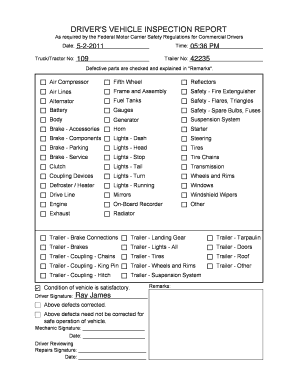
- Click the ‘Get Form’ button to access the Driver Vehicle Inspection Report. This will open the form in the designated online editor.
- Begin by entering the date of the inspection in the 'Date' field. Ensure that the date is formatted correctly for clarity.
- Input the time of the inspection in the 'Time' field. Use the correct AM or PM designation following the time to avoid confusion.
- Fill in the 'Truck/Tractor No' field with the identification number assigned to the vehicle being inspected.
- Enter the 'Trailer No' associated with the vehicle. This number helps in tracking the specific trailer being inspected.
- Review the checklist section where various vehicle components are listed. Check or mark the items accordingly to indicate their condition. Ensure all relevant parts are reviewed for accuracy.
- In the 'Remarks' section, provide explanations for any defective parts identified during the inspection. This is vital for record-keeping and ensuring vehicle safety.
- Once completed, read through the 'Condition of vehicle' statement and select either 'satisfactory' or note any additional context if necessary.
- Have the driver sign in the designated 'Driver Signature' field to confirm the inspection has been completed.
- If any defects were found, the mechanic must sign in the 'Mechanic Signature' field after making necessary repairs.
- Lastly, fill in the reviewing mechanic's signature and the respective dates as needed in the reviewing section.
- After ensuring that all required fields are filled out accurately, you can save changes, download, print, or share the report as needed.
Complete your Driver Vehicle Inspection Report online today for seamless documentation and compliance.
Guidance: Section 396.11(a) requires every driver to prepare a DVIR at the completion of each day's work on each vehicle operated. A driver who operates two or more vehicles in a 24-hour-period must prepare a DVIR at the completion of the tour of duty in each vehicle.