Loading
Form preview
  • US Legal Forms
  • Other Templates
  • More Forms
  • More Multi-State Forms
  • Lakotaonline Com

Get Lakotaonline Com

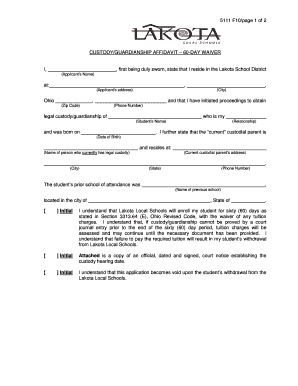
5111 F10/page 1 of 2CUSTODY/GUARDIANSHIP AFFIDAVIT 60DAY WAIVERI,, first being duly sworn, state that I reside in the Lakota School District (Applicants Name)at:, (Applicants address)Ohio, (City),and.

How it works

  1. Open form

    Open form follow the instructions

  2. Easily sign form

    Easily sign the form with your finger

  3. Share form

    Send filled & signed form or save

How to fill out the Lakotaonline Com online

Filling out the Lakotaonline Com form is an essential step for individuals seeking legal custody or guardianship within the Lakota School District. This guide provides you with clear, easy-to-follow instructions to accurately complete the form online.

Follow the steps to complete the Lakotaonline Com form

  1. Press the ‘Get Form’ button to obtain the form and open it in the appropriate editing tool.
  2. Begin by entering the applicant's name in the designated field labeled 'Applicant’s Name.' Ensure that you provide your name as it appears officially.
  3. Next, input the applicant's address in the 'Applicant’s address' section. This includes the street address, city, state, and zip code.
  4. In the section labeled 'Student’s Name,' enter the full name of the student for whom you are seeking custody or guardianship.
  5. Input the student's date of birth in the corresponding field, formatted appropriately.
  6. Indicate the relationship between the applicant and the student in the 'Relationship' section, such as parent, grandparent, etc.
  7. Specify the name of the current custodial parent in the field labeled 'Name of person who currently has legal custody.'
  8. Complete the current custodial parent's address by filling in the relevant fields for city, state, and phone number.
  9. Provide the name of the student's prior school of attendance in the space marked 'Previous school.'
  10. Fill in the city and state where the previous school is located.
  11. Initial all required consent statements to indicate understanding of the terms, including the implications of the 60-day tuition waiver.
  12. Attach a copy of the official court notice establishing the custody hearing date as indicated.
  13. Finally, sign the form in the presence of a notary public, ensuring to date the signature and include the necessary notary information.
  14. After completing all sections and ensuring accuracy, save your changes, and prepare to download, print, or share the form as required.

Complete your Lakotaonline Com document online today for a smooth enrollment process.

Get form

Experience a faster way to fill out and sign forms on the web. Access the most extensive library of templates available.
Get form

Related content

Search for Public School Districts - District...
Website: http://www.lakotaonline.com/, District Demographics: School District Demographic...
Learn more
Lakota Local Prof Devel II - Instructor: Sharon...
... their effectiveness within the school district. Cost: $360. Timespan of Course: June...
Learn more
Lakota Local School District (Butler County)...
Studerende og personale. Studerende, 16.585 (2017). Atletisk konference, Greater...
Learn more

Related links form

Mrt Examap.doc. Forms And Form Information - Dshs State Tx Excellent Provider Service Form - Texas Department Of State Health ... APPLICATION INSTRUCTIONS FOR NON-CERTIFIED ... - Dshs State Tx Chapter 1 - Texas Department Of State Health Services - Dshs State Tx

Questions & Answers

Get answers to your most pressing questions about US Legal Forms API.

Contact support

As the Resolution Field is a Required Field, if it is added to a "Default" Screen, newly created or edited issues will be in a Resolved state as the field would be populated by the Default Resolution Value.

For this step, we will add a new transition to the workflow that will set the resolution field to the expected resolution value: Make sure you are still logged in as a Jira Administrator. Go back to the page ⚙ > Issues > Workflows. Scroll down to the workflow identified in Step 1, and click on the Copy button next to it.

This work around worked for me. Remove the Resolution field from all views but the Closed screen. Remove the default value for the Resolution field. Set a Validator up so that the Resolution field must be changed when transitioning to Closed.

Resolution Set Using a POST Function Locate your Workflow: > Issues > Workflows. Click Edit under Actions for your workflow. Select your "Done" transition, and Click POST Functions. Click 'Add POST Function > Select 'Update Issue Field' Select Resolution for Issue Field and the appropriate Field Value.

Resolution Set Using a POST Function Locate your Workflow: > Issues > Workflows. Click Edit under Actions for your workflow. Select your "Done" transition, and Click POST Functions. Click 'Add POST Function > Select 'Update Issue Field' Select Resolution for Issue Field and the appropriate Field Value.

Resolution is a system Field and it's always mandatory. You cannot make it optional from Configuration scheme. You need to remove it from create/edit screen and try creating a task. Try removing it and create a new task.

This work around worked for me. Remove the Resolution field from all views but the Closed screen. Remove the default value for the Resolution field. Set a Validator up so that the Resolution field must be changed when transitioning to Closed.

Resolution is a special field in JIRA. It has an initial value of 'Unresolved', which means the field is NULL in the database. It is ALWAYS required when it appears on the screen. ONLY display it on the screen during a transition to the status where you want it set.

1:30 10:38 How to Make Fields Required in Jira as a Jira Admin | Atlassian Jira YouTube Start of suggested clip End of suggested clip And you're gonna find your component. Field and once you find this component field you hit required.MoreAnd you're gonna find your component. Field and once you find this component field you hit required. And this is great this is this is what we want right somebody wanted the field required.

Resolution is a system Field and it's always mandatory. You cannot make it optional from Configuration scheme. You need to remove it from create/edit screen and try creating a task. Try removing it and create a new task.

Get This Form Now!

Use professional pre-built templates to fill in and sign documents online faster. Get access to thousands of forms.
Get form
If you believe that this page should be taken down, please follow our DMCA take down processhere.
Get Lakotaonline Com
Get form
  • Adoption
  • Bankruptcy
  • Contractors
  • Divorce
  • Home Sales
  • Employment
  • Identity Theft
  • Incorporation
  • Landlord Tenant
  • Living Trust
  • Name Change
  • Personal Planning
  • Small Business
  • Wills & Estates
  • Packages A-Z
  • Affidavits
  • Bankruptcy
  • Bill of Sale
  • Corporate - LLC
  • Divorce
  • Employment
  • Identity Theft
  • Internet Technology
  • Landlord Tenant
  • Living Wills
  • Name Change
  • Power of Attorney
  • Real Estate
  • Small Estates
  • Wills
  • All Forms
  • Forms A-Z
  • Other Templates
  • Legal Hub
  • About Us
  • Help Portal
  • Legal Resources
  • Blog
  • Affiliates
  • Contact Us
  • Delete My Account
  • Site Map
  • Industries
  • Forms in Spanish
  • Localized Forms
  • State-specific Forms
  • Forms Kit
  • Real Estate Handbook
  • All Guides
  • Notarize
  • Incorporation services
  • For Consumers
  • For Small Business
  • For Attorneys
  • USLegal
  • FormsPass
  • pdfFiller
  • signNow
  • altaFlow
  • DocHub
  • Instapage
Form Packages
  • Adoption
  • Bankruptcy
  • Contractors
  • Divorce
  • Home Sales
  • Employment
  • Identity Theft
  • Incorporation
  • Landlord Tenant
  • Living Trust
  • Name Change
  • Personal Planning
  • Small Business
  • Wills & Estates
  • Packages A-Z
Form Categories
  • Affidavits
  • Bankruptcy
  • Bill of Sale
  • Corporate - LLC
  • Divorce
  • Employment
  • Identity Theft
  • Internet Technology
  • Landlord Tenant
  • Living Wills
  • Name Change
  • Power of Attorney
  • Real Estate
  • Small Estates
  • Wills
  • All Forms
  • Forms A-Z
  • Other Templates
Customer Service
  • Legal Hub
  • About Us
  • Help Portal
  • Legal Resources
  • Blog
  • Affiliates
  • Contact Us
  • Delete My Account
  • Site Map
  • Industries
  • Forms in Spanish
  • Localized Forms
  • State-specific Forms
  • Forms Kit
Legal Guides
  • Real Estate Handbook
  • All Guides
Prepared for you
  • Notarize
  • Incorporation services
Our Customers
  • For Consumers
  • For Small Business
  • For Attorneys
Our Sites
  • USLegal
  • FormsPass
  • pdfFiller
  • signNow
  • altaFlow
  • DocHub
  • Instapage
Social Media
Call us now toll free:
+1 833 426 79 33
As seen in:
© Copyright 1999-2026 airSlate Legal Forms, Inc. 17 Station Street, Ste. 203, Brookline, MA 02445
  • Your Privacy Choices
  • Terms of Service
  • Privacy Notice
  • Content Takedown Policy
  • Bug Bounty Program