Loading
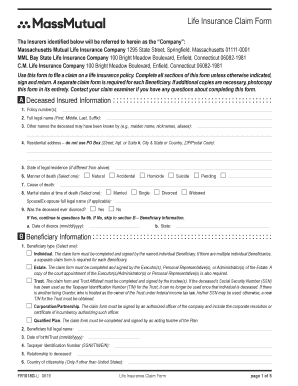
Get Submitting A Death Claim - Massmutual
How it works
-

Open form follow the instructions
-

Easily sign the form with your finger
-

Send filled & signed form or save
How to fill out the Submitting A Death Claim - MassMutual online
Filing a death claim for a life insurance policy can be a challenging process, especially during a time of loss. This guide provides clear and supportive instructions on how to accurately complete the Submitting A Death Claim - MassMutual form online, ensuring you can navigate this essential task with confidence.
Follow the steps to successfully complete the death claim form.
- Click ‘Get Form’ button to obtain the form and access it in your browser. This will allow you to fill out and manage your claim document conveniently.
- Begin by filling out section A – Deceased Insured Information. Here, you will input the policy number, the full legal name of the deceased, and any other names they may have been known by. Provide their residential address, state of legal residence, manner of death, cause of death, marital status, and information about any divorce if applicable.
- Proceed to section B – Beneficiary Information. Select the appropriate beneficiary type and fill in the full legal name, date of birth, taxpayer identification number, relationship to the deceased, citizenship, and residential address for the beneficiary as well.
- In section C – Payment Options, select the preferred method for receiving the claim payment. Options include lump sum via direct deposit, check, or benefit management account (BMA). If you select direct deposit, you will need to complete section D.
- If opting for direct deposit, fill out section D with your bank account type, full legal name on the bank account, name of the financial institution, routing number, and account number. It is advisable to attach a voided check.
- If you have chosen the BMA as your payment option, complete section E for New Beneficiary Designation. Here, you will specify additional beneficiaries, their relationship to the deceased, and their respective shares.
- Finally, review all the information filled out and proceed to section G to sign and date the form. Ensure you have all required documents ready for submission.
- Once completed, return all pages of the form along with any additional required documents. You may save changes, download, print, or share the form as necessary.
Complete the Submitting A Death Claim - MassMutual form online today to ensure your claim is processed efficiently.
Step 1: Decide What You Want to Do. When you change jobs, you have several 401k rollover options: ... Step 2: Set Up a Rollover Account. ... Step 3: Contact MassMutual. ... Step 4: Report the Rollover on Your Taxes.