Loading
Get Aarhus Folkeregister/ics West
How it works
-

Open form follow the instructions
-

Easily sign the form with your finger
-

Send filled & signed form or save
How to fill out the Aarhus Folkeregister/ICS West online
Filling out the Aarhus Folkeregister/ICS West form online is an important step for people moving to Denmark. This guide will provide you with clear, step-by-step instructions to help you navigate through the form efficiently.
Follow the steps to successfully complete the form online.
- Press the ‘Get Form’ button to acquire the form and open it in your preferred editor.
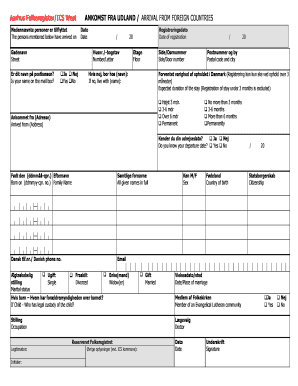
- Begin by entering the names of the people who have arrived in Denmark in the section labeled 'Nedennævnte personer er tilflyttet.' Ensure all names are spelled correctly.
- Fill in the 'Gadenavn' (Street) by entering your street name accurately.
- Answer the question 'Er dit navn på postkassen?' (Is your name on the mailbox?) by selecting either 'Ja' (Yes) or 'Nej' (No).
- Provide the 'Dato' (Date) of arrival from foreign countries in the specified format.
- Input your 'Husnr./-bogstav' (Number/Letter) related to your residence.
- Share the 'Registreringsdato' (Date of registration) using the required format.
- Specify the 'Etage' (Floor) you reside on to assist with identification.
- If your name is not on the mailbox, indicate who you are living with by filling out the section that begins with 'Hvis nej, bor hos (navn):' (If no, live with (name):).
- List your 'Side/Dørnummer' (Side/Door number) next in the designated area.
- Fill in your 'Postnummer og by' (Postal code and city) accurately.
- Indicate the 'Forventet varighed af opholdet i Danmark' (Expected duration of the stay) by selecting one of the specified options.
- Answer whether you know your departure date by selecting 'Ja' (Yes) or 'Nej' (No) under the relevant question.
- Enter your 'Født den' (Born on) information, including your full name as per the 'Samtlige fornavne' (All given names in full) section.
- Provide your 'Dansk tlf.nr.' (Danish phone number) and email address.
- Choose your 'Ægteskabelig stilling' (Marital status) by checking the relevant box.
- If you have children, specify who has legal custody in the section provided.
- List your 'Stilling' (occupation) and initialer (initials) as required.
- Select your gender by marking 'M' or 'F' next to 'Køn' (Sex).
- Confirm your 'Fødeland' (Country of birth) and 'Statsborgerskab' (Citizenship).
- If applicable, include the 'Vielsesdato/sted' (Date/Place of marriage).
- Complete any additional information required for 'Øvrige oplysninger (evt. ICS kommune)'.
- Ensure to sign and date the form where indicated.
- Once all fields are accurately completed, save your changes, and proceed to download, print, or share the completed form as needed.
Complete your Aarhus Folkeregister/ICS West form online today to ensure proper registration!
If your financial situation is so difficult that you can't make any payment on your debt, debt settlement is not a good option. You need to be able to offer lump sum payment for debt settlement to work – even the best debt settlement agreements are at least 25% of the total amount owed.