Loading
Get Imo Pre-authorization Network Request Form - Carrollton
How it works
-

Open form follow the instructions
-

Easily sign the form with your finger
-

Send filled & signed form or save
How to fill out the IMO Pre-Authorization NETWORK Request Form - Carrollton online
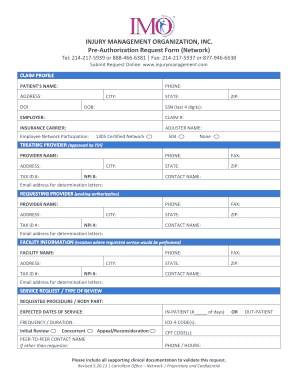
Filling out the IMO Pre-Authorization NETWORK Request Form - Carrollton is an important step in the process of obtaining necessary care approvals. This guide will walk you through each section of the form, ensuring clear understanding and proper completion.
Follow the steps to successfully complete the form.
- Click ‘Get Form’ button to obtain the online form and open it in your chosen editor.
- In the 'Claim Profile' section, enter the patient's name, phone number, and complete address including city, state, and zip code. Ensure all information is accurate as it is crucial for processing.
- Provide the date of injury (DOI), date of birth (DOB), and the last four digits of the social security number (SSN) of the patient.
- Fill in the employer's name and the claim number associated with this request.
- Enter the insurance carrier’s name and the adjuster's name handling the claim.
- In the 'Treating Provider' section, input the name and address of the approved provider along with their tax ID and NPI numbers.
- Next, do the same for the 'Requesting Provider', ensuring you include their direct contact information for determination letters.
- Provide details for the facility where the requested service will be performed, including the facility name and contact details.
- In the 'Service Request / Type of Review' section, specify the procedure being requested and the expected dates of service. Indicate whether the patient will be an in-patient or out-patient.
- Include the frequency and duration of the requested service and necessary medical codes such as ICD-9 and CPT codes.
- If applicable, provide the name and contact details of the peer-to-peer contact that is not the requestor.
- Ensure all supporting clinical documentation is attached to validate this request.
- Once all sections are completed, save changes, download, print, or share the form as required.
Complete your documentation online today for efficient processing.
Start the invoice with a professional header that includes the business name, business logo (if any), address, and contact information. After this, add the client's business name, the name of the contact person, and their precise contact information.