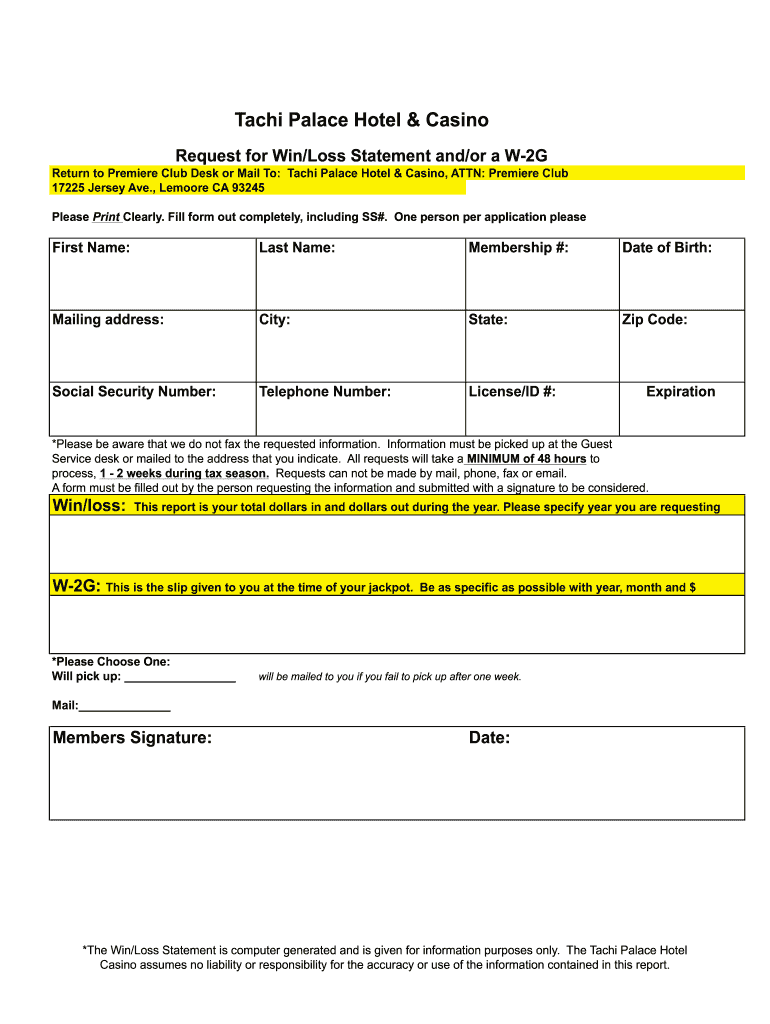
Tachi Palace Hotel & Casino Request for Win/Loss Statement and/or a W2G Return to Premiere Club Desk or Mail To: Tachi Palace Hotel & Casino, ATTN: Premiere Club 17225 Jersey Ave., Lemoore.
Loading

Open form follow the instructions

Easily sign the form with your finger

Send filled & signed form or save
How to fill out the Tachi Palace Win Loss Statement online
Filling out the Tachi Palace Win Loss Statement is essential for accurately reporting your gaming activity. This guide provides a clear, step-by-step approach to help you complete the form with confidence.
Follow the steps to successfully complete the form.
- Click ‘Get Form’ button to access the Win Loss Statement form and launch it in the online editor.
- Begin filling out the form by entering your personal information. Start with your first name and last name, ensuring that you print each letter clearly.
- Provide your membership number, which identifies your account with Tachi Palace. This information is essential for processing your request.
- Indicate your date of birth for verification purposes. Ensure that the format is clear and follows any specified guidelines.
- Complete your mailing address, including the city, state, and zip code. Accurate information ensures that the report is sent to the correct location.
- Enter your social security number, which is necessary for completing the form and processing your request.
- Include your telephone number for any necessary follow-ups regarding your request.
- Provide your license or ID number, along with the expiration date, to further verify your identity.
- In the designated section, state the year for which you are requesting your win/loss statement, as well as the following details if applicable: the total dollars in and out.
- Choose whether you will pick up your report in person or prefer it to be mailed. If opting for mailing, ensure that your address is correct.
- Sign and date the form to validate your request. Remember, the form must be submitted with a signature to be processed.
- Once you have filled out all sections of the form, review everything for accuracy and clarity. After confirming your details, save any changes, download a copy of the form, or share it as necessary.
Start completing your Tachi Palace Win Loss Statement online today!
Experience a faster way to fill out and sign forms on the web. Access the most extensive library of templates available.
Related content
TRKE-010613, Adriana Lee Poindexter, Tachi Palace Hotel and Casino, Fresno...
took ANR to the Tachi Palace Hotel & Casino's Career Resource Expo in. Lemoore...
Wins, 8. By knockout, 3. By submission, 3. By decision, 2. Losses, 1. By submission, 1...
Get answers to your most pressing questions about US Legal Forms API.
Is a win loss statement the same as a W2G?
A W2-G is an official tax document that is issued for individual jackpots and other gaming winnings over a certain amount; you should be given a copy of this form at the time the winnings are awarded. This is not the same as an annual win/loss statement.
How do I get a win loss statement?
You will directly request the WIN LOSS statement from the or gambling establishment. If you have received gambling winnings exceeding $600 during the tax year, the W-9 form will be sent to the gambling entity.
How do I get a win loss statement from online ?
0:00 0:41 Where do I find my win/loss statement? - YouTube YouTube Start of suggested clip End of suggested clip Then click on my account settings win loss statement. And select the year of the statement you'dMoreThen click on my account settings win loss statement. And select the year of the statement you'd like to see click on download statement. And you're done to understand the statement.
What proof do you need for gambling losses?
The date and type of your specific wager or wagering activity. The name and address or location of the gambling establishment. The names of other persons present with you at the gambling establishment. The amount(s) you won or lost.
What is the win loss statement?
A Win/Loss statement is a report that provides an estimated play (amount of money that is won and loss) for the calendar year based when a Players Club card is properly inserted into the gaming device during play.
How do I prove my losses online gambling?
Other documentation to prove your losses can include: Form W-2G. Form 5754. wagering tickets. canceled checks or credit records. receipts from the gambling facility.
Use professional pre-built templates to fill in and sign documents online faster. Get access to thousands of forms.
If you believe that this page should be taken down, please follow our DMCA take down process here.