The Clarity Urocheck 120 Urine Analyzer reads urine test strips. It stores resultsand prints reports without the need for special training. The Clarity Urocheck 120Urine Analyzer runs a selftest each.
Loading

Open form follow the instructions

Easily sign the form with your finger

Send filled & signed form or save
How to fill out the ClarityUrineHCG Liquid Controls-Quality Control Log online
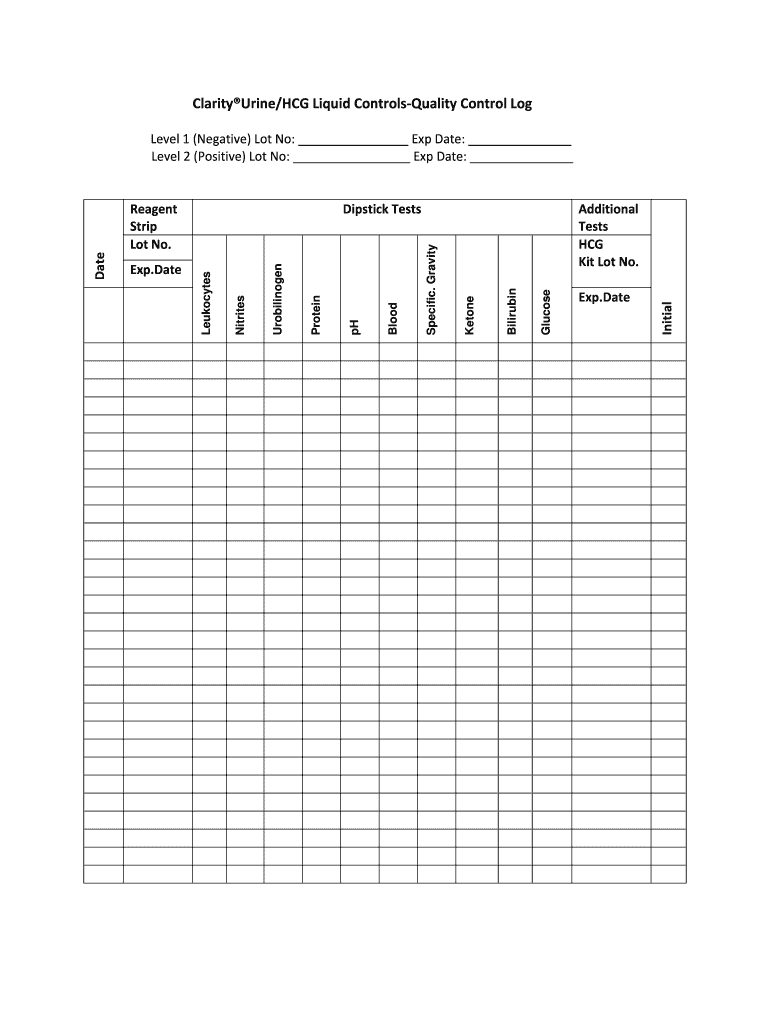
This guide provides step-by-step instructions on how to fill out the ClarityUrineHCG Liquid Controls-Quality Control Log online. Following these instructions will help ensure that your quality control logging is accurate and efficient.
Follow the steps to complete the quality control log effectively.
- Click ‘Get Form’ button to access the ClarityUrineHCG Liquid Controls-Quality Control Log and open it in your digital PDF editor.
- Begin by entering the date in the designated field. This will help track the specific time of testing and results.
- Fill in the results for each dipstick test, including urobilinogen, protein, pH, blood, specific gravity, ketone, bilirubin, and glucose. Ensure the values entered are from your most recent tests.
- For nitrites and leukocytes, similarly record the test results in their respective fields.
- In the reagent strip section, indicate the lot number and expiration date of the strip you used for testing.
- For additional tests, including the HCG kit, enter the lot number and expiration date as well.
- Record the initial results for both level 1 (negative) and level 2 (positive) tests. Enter the lot numbers and expiration dates associated with each level.
- Review all entries for accuracy, then save your changes. You may also choose to download, print, or share the completed form as needed.
Complete your quality control documentation online for a seamless experience.
Experience a faster way to fill out and sign forms on the web. Access the most extensive library of templates available.
Related content
Combination Quality Control Log Sheet. Urine Chemistry & Urine Pregnancy. Health...
Get answers to your most pressing questions about US Legal Forms API.
What is hCG urine QC POS?
The hCG urine test is a qualitative test, which means that it will tell you whether or not it detects the hCG hormone in your urine. It's not intended to reveal specific levels of the hormone. The presence of hCG in your urine is considered a positive sign of pregnancy.
What is hCG if not pregnant?
Non-pregnant women: less than 5 mIU/mL. Healthy men: less than 2 mIU/mL.
How do I read my hCG urine test results?
A high level of HCG indicates that a person is pregnant. A negative qualitative HCG test means a person is not pregnant. If they still suspect that they are pregnant, a person should repeat the test after a few days . False-positive results may occur if hormone levels are high due to menopause or hormone supplements.
How do you read the hCG clarity pregnancy test?
Read results at 5 minutes and no later than 10 minutes. Positive (Pregnant) Two distinct red lines appear. One line should be in the control region (C) and another line should be in the test region (T). This means you are probably pregnant.
What does hCG internal QC mean?
SP Brand Rapid Urine hCG Test Cassettes have Internal Quality Controls (QC) within the test. A line appearing in the control region of the test is the positive internal QC. It confirms sufficient specimen volume and correct procedural technique. A clear background is the internal negative QC.
What does the C and T mean on a pregnancy test?
Distinct and consistent color bands appear on the Control (C) and Test (T) regions. Color intensity of the bands may vary according to concentration and level of hCG development. The test line is usually slightly weaker in intensity in comparison to the control line.
How often are external controls run for pregnancy test?
External positive and negative controls are to be performed on a monthly basis. 2. External positive and negative controls are to be performed on each new lot of test kits.
What is hCG control?
The hCG Control Set is intended for use with the QuickVue®+ One-Step hCG Combo, QuickVue® One-Step hCG Urine or Combo, and the RapidVue® hCG Test. These controls provide an aid in the interpretation of positive and negative test results and verify proper test performance.
What is a positive hCG blood test?
An hCG level of less than 5 mIU/mL is considered negative for pregnancy, and anything above 25 mIU/mL is considered positive for pregnancy. An hCG level between 6 and 24 mIU/mL is considered a grey area, and you'll likely need to be retested to see if your levels rise to confirm a pregnancy.
How often is QC required for hCG kit?
repeat the test after 2 to 3 days with a new device and fresh sample. Invalid: If no line is visible in the control region within 5 minutes, repeat the assay with a new test device.
Use professional pre-built templates to fill in and sign documents online faster. Get access to thousands of forms.
If you believe that this page should be taken down, please follow our DMCA take down process here.