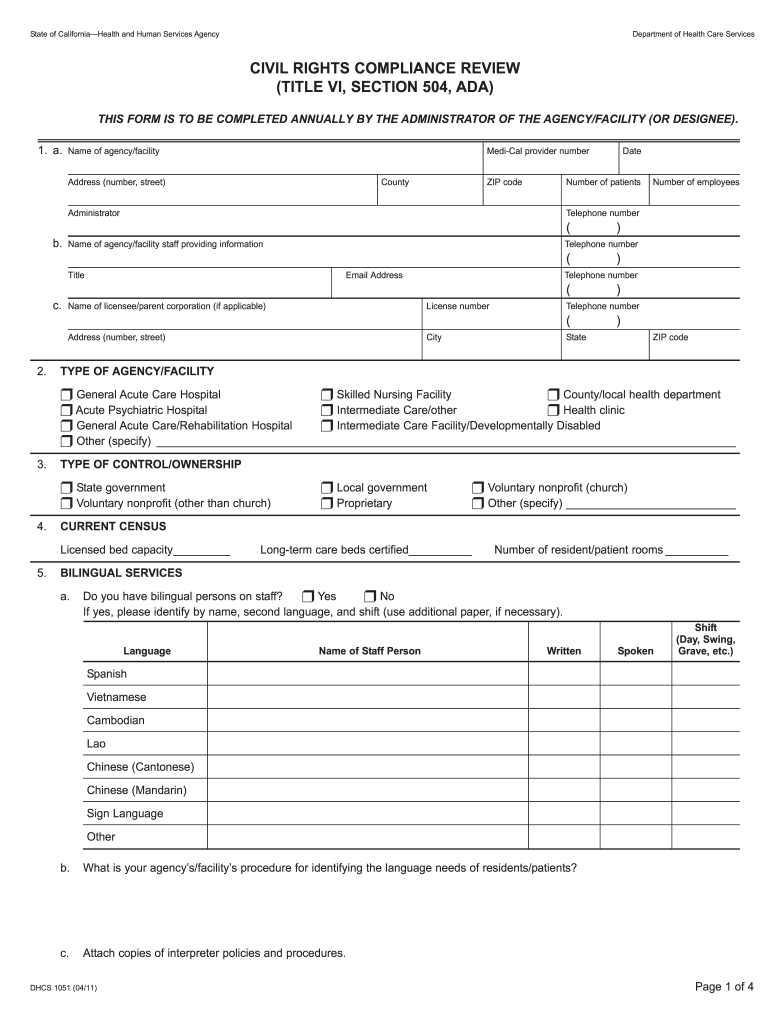
ATOR OF THE AGENCY/FACILITY (OR DESIGNEE). 1. a. Name of agency/facility Medi-Cal provider number Address (number, street) County ZIP code Number of patients Administrator Telephone number Name of agency/facility staff providing information Telephone number ( b. ( Title Email Address ) ) ) Name of licensee/parent corporation (if applicable) License number Telephone number Address (number, street) City State ( 2. Number of employees Telephone number ( c. Date ) ZIP code.
Loading

Open form follow the instructions

Easily sign the form with your finger

Send filled & signed form or save
How to fill out the Dhs Form 1051 online
Filling out the Dhs Form 1051 is an important process for ensuring compliance with civil rights regulations. This guide provides a step-by-step approach to assist you in completing the form online with clarity and precision.
Follow the steps to successfully complete the Dhs Form 1051.
- Click ‘Get Form’ button to obtain the form and open it in an online editor.
- Begin by entering the name of your agency or facility along with the Medi-Cal provider number. Make sure to fill in all required fields accurately, including the address and contact information.
- Indicate the number of patients currently served by your facility, including the names and contact details of relevant staff who will provide further information if needed.
- Specify the type of agency or facility by selecting the appropriate checkbox according to the options provided, such as general acute care hospital, skilled nursing facility, or health clinic.
- Detail the current census figures, including licensed bed capacity and the number of resident/patient rooms available.
- In the bilingual services section, indicate whether bilingual staff are available. If applicable, list their names, the languages spoken, and their shifts.
- Provide information concerning services for disabled employees and residents, including the availability of sign language interpreters and accessibility features.
- Complete the section on ethnic, disability, and gender composition of staff. Record the number in specified categories such as managerial, clerical, and service workers.
- Record the characteristics of residents, including demographics, how many are from particular ethnic backgrounds, and their age range.
- Review and verify the ethnic composition of the general service population based on census data, ensuring the percentages accurately reflect your community.
- Outline your advisory board or board of directors’ ethnic and disability composition, including recruitment practices.
- Specify equal access practices for residents, addressing policies related to admissions for persons with HIV/AIDS and relevant training provided to staff.
- Ensure to answer questions regarding admission policies without discrimination based on race, color, or national origin.
- Once all sections are completed, thoroughly review your entries for accuracy. You can then save your changes, download the form, or print it out for submission.
Start filling out the Dhs Form 1051 online today to ensure compliance and enhance your facility's services.
Experience a faster way to fill out and sign forms on the web. Access the most extensive library of templates available.
Related content
Links to various pages across DHS websites that have forms that the public might use.
Mar 17, 2020 — Online forms are some of the most searched information on government...
If the child safety seat registration form has not ... ACADEMY OF PEDIATRICS. PEDIATRICS...
Get answers to your most pressing questions about US Legal Forms API.
How do I get good logo ideas?
Top 10 Logo Design Tips & Tricks: A picture paints a thousand words. Use empty space to keep your logo design clean. Use shapes to think inside the box. Imagine your logo in situ. Color is key for good design. Be literal with your logo. Be authoritative with your logo. Create visual salience with a pop of color.
How do you create a logo concept?
How to design a logo Define your brand identity. Seek inspiration. Determine logo style. Choose a type. Decide on a color scheme. Pick a font. Outline a logo shape. Create a logo.
How do companies make logos?
What are the 7 steps to design a logo? — Step 1: Evaluate the brand. Step 2: Research the industry. Make a list of where the logo will be used. Sketch a variety of logo concepts. Create digital drafts in vector software. Refine your logo design with feedback. Prepare and deliver the final logo files.
How do you brainstorm a logo design?
10 Best Tips to Brainstorm Logo Design Ideas for a Startup... Bring in elements of openness. ... Try looking for inspiration around you. ... Make use of geometric shapes in your logo design ideas. ... Try the black and white logo. ... Incorporate the name of your company in the logo design. ... Focus majorly on marketability.
How do I find a good logo?
How to choose a logo for your business Understand the purpose of your logo. Use a color that makes your logo stand out. Get familiar with different types of logos. Balance your design elements. Make your logo versatile. Get help from an expert.
How do you come up with a logo concept?
How to Design a Logo for Free Start With Your Story. Brainstorm Words That Describe Your Brand. Sketch Ideas Based on These Words. Test Your Top Sketches With Your Buyer Persona. Refine Your Chosen Sketch. Develop Your Logo's Layout on a Free Design Platform. Pick Versatile Color Options. Choose a Font.
What must a logo have?
What Makes A Good Logo? # A good logo is distinctive, appropriate, practical, graphic and simple in form, and it conveys the owner's intended message. A concept or “meaning” is usually behind an effective logo, and it communicates the intended message.
What are the core concepts of logo?
10 logo design principles to follow Make it simple. ... Design for an audience. ... Make it memorable. ... Make it timeless. ... Make it versatile and scalable. ... Use a quality typeface. ... Be strategic with color. ... It should look great in black and white.
Use professional pre-built templates to fill in and sign documents online faster. Get access to thousands of forms.
If you believe that this page should be taken down, please follow our DMCA take down process here.