Loading
Get Public Partnerships Paper Timesheets
How it works
-

Open form follow the instructions
-

Easily sign the form with your finger
-

Send filled & signed form or save
How to fill out the Public Partnerships Paper Timesheets online
Filling out the Public Partnerships Paper Timesheets accurately is essential for ensuring timely payment for services provided. This guide will help you navigate the process step-by-step, ensuring that all required information is correctly recorded.
Follow the steps to complete your timesheet effectively
- Click ‘Get Form’ button to access the timesheet and open it in your editor.
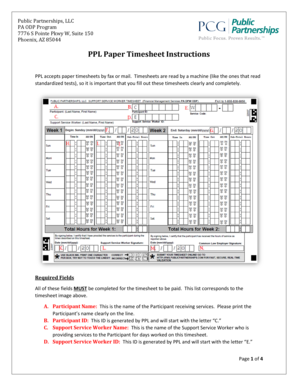
- Print the participant name clearly in the designated space. This refers to the person receiving the services.
- Enter the participant ID, which starts with the letter 'C'. This number is generated by Public Partnerships.
- Fill in the name of the support service worker who provided services for the specified days.
- Provide the support service worker ID, which will begin with the letter 'E'.
- Input the approved service type code as per the participant’s Individual Support Plan (ISP). Remember, only one service per timesheet is allowed.
- Indicate the start date of the pay period in the 'Week 1 Begin Date' section.
- Fill out the end date of the pay period in the 'Week 2 End Date' section.
- Record the time the support service worker started working in the 'Time In' field.
- Document the time the support service worker finished in the 'Time Out' field.
- Mark whether the worked hours fall in the AM or PM by filling in the corresponding circle.
- Enter the date that the support service worker signed the timesheet.
- Provide the signature of the support service worker who delivered the services.
- Indicate the date when the common law employer reviewed and signed the timesheet.
- Complete the signature of the common law employer who has approved the timesheet.
- If applicable, follow special instructions for overnight work or multiple entries for service in a day.
- Once all information is filled out clearly, save any changes made, and ensure the form is ready to be printed, faxed, or mailed as necessary.
Complete your Public Partnerships Paper Timesheets online for accuracy and efficiency.
Most businesses and organisations use standardised time increments when recording hours on a timesheet. Common increments include: Hourly: Time is recorded for every hour worked. Quarter-Hourly (15 minutes): Time is rounded to the nearest 15-minute increment (e.g., 1.00, 1.25, 1.50, 1.75).
Industry-leading security and compliance
US Legal Forms protects your data by complying with industry-specific security standards.
-
In businnes since 199725+ years providing professional legal documents.
-
Accredited businessGuarantees that a business meets BBB accreditation standards in the US and Canada.
-
Secured by BraintreeValidated Level 1 PCI DSS compliant payment gateway that accepts most major credit and debit card brands from across the globe.