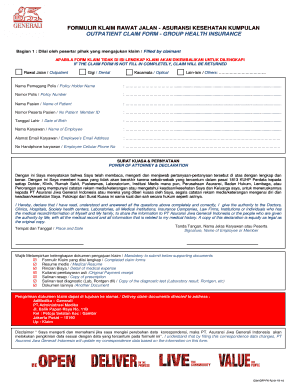
FORMULIR KLAIM RAWAT JALAN ASURANSI KESEHATAN KUMPULAN OUTPATIENT CLAIM FORM GROUP HEALTH INSURANCE Bagian 1 : Diisi oleh peserta/ pihak yang mengajukan klaim / Filled by claimant APABILA FORM KLAIM.

How it works
  • Open form

    Open form follow the instructions

  • Easily sign form

    Easily sign the form with your finger

  • Share form

    Send filled & signed form or save

How to fill out the Form Generali Rawat Jalan online

This guide provides a clear and detailed process for completing the Form Generali Rawat Jalan online. Whether you are submitting a claim for outpatient services, dental care, or other medical expenses, this step-by-step approach will ensure you fill out the form correctly.

Follow the steps to complete the Form Generali Rawat Jalan

  1. Press the ‘Get Form’ button to access the form and launch it in the online editor.
  2. Begin by entering the information required in Section 1: Fill out the details as the claimant. This includes your name, policy number, patient name, and contact information. Ensure all fields are completed fully to avoid claim rejection.
  3. In the section for Power of Attorney & Declaration, read through the terms and provide your signature and the date at the bottom of this section to confirm that you understand and authorize the necessary parties to share your medical information.
  4. Attach all required supporting documents as listed in the form. These may include medical resumes, payment receipts, and diagnostic tests. Ensure you have complete copies ready to submit.
  5. Once all parts of the form are filled out and documents are attached, review everything for accuracy. Then, you can either download or print the completed form for your records.
  6. Finalize the process by submitting your claim documents as directed to the specified address in the form.

Take the next step in managing your health insurance claim by filling out the Form Generali Rawat Jalan online today.

Get form

Experience a faster way to fill out and sign forms on the web. Access the most extensive library of templates available.

Related content

N-PX 1 fp0015663_npx.htm OMB

Form N-PX is to be used by a registered management investment company, other than...

Learn more
Uni 10339 - Largest PDF Library

... 2002 Disegni Tecnici Principi Generali Di Rappresentazione Preparazione De uni ... di...

Learn more
Questions & Answers

Get answers to your most pressing questions about US Legal Forms API.

Contact support

In which currency should I invoice?

You provide customers with quotes and invoices in two currencies, U.S. dollars and the buyer's local currency. This practice is common for exporters around the globe, especially in Europe where multiple currencies are used frequently. Here's an example of how a U.S. exporter could invoice in two currencies.

Foreign currency invoices are legally compliant with your country's regulations. If compliant, your prices are accurately converted into the foreign currency using an up-to-date exchange rate. Any variations in the exchange rate that lead to exchange gains and losses are accounted for so your books still add up.

At the date a foreign currency transaction occurs, each asset, liability, revenue, expense, gain, or loss arising from the transaction is recorded in the functional currency of the recording entity using the exchange rate in effect at that date.

Foreign currency invoices are legally compliant with your country's regulations. If compliant, your prices are accurately converted into the foreign currency using an up-to-date exchange rate. Any variations in the exchange rate that lead to exchange gains and losses are accounted for so your books still add up.

Anatomy of an invoice Identify the parties. Include your business details (including tax number if you have one) ... Describe what's being exchanged. Describe the goods or services provided using the same language as in your quote, if you provided one. ... Give the payment details. Add the due date.

USD is the international currency code established by the ISO to represent the American dollar. It is composed of the country code ( US ), followed by the letter "D" for "dollar." Write the dollar figure first, followed by a non-breaking space and the code: 350 000 USD.

Manually record the Invoice payment in the customer's currency (say GBP) to the Undeposited Funds account. Provide the appropriate exchange rate for customer's currency and base currency while recording the payment. Now, the Undeposited Funds will have the payment amount in the base currency (USD).

When entering invoices, credit notes, and quotes, you should create them as usual. However, you should also consider the following: The default exchange rate appears in the top section of the invoice or credit note. If you chose to use live exchange rates, this is the most up to date rate from the FRS.

Get This Form Now!

Use professional pre-built templates to fill in and sign documents online faster. Get access to thousands of forms.

If you believe that this page should be taken down, please follow our DMCA take down process here.

Get Form Generali Rawat Jalan