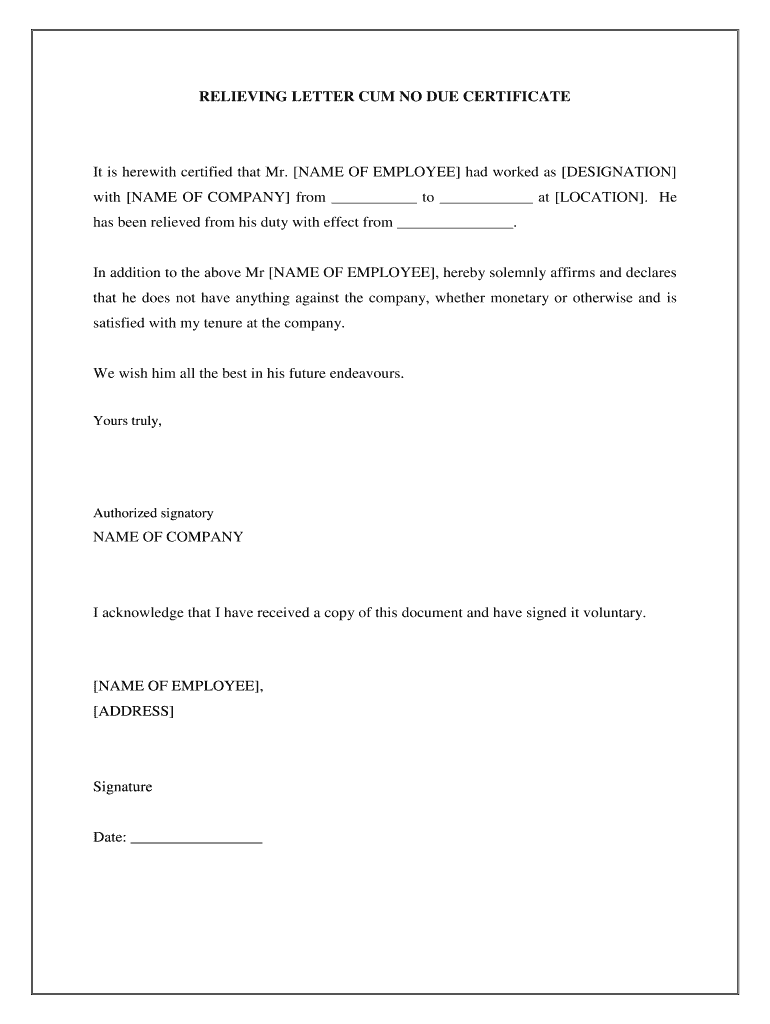
RELIEVING LETTER CUM NO DUE CERTIFICATEIt is herewith certified that Mr. NAME OF EMPLOYEE had worked as DESIGNATION with NAME OF COMPANY from to at LOCATION . He has been relieved from his duty with.
Loading

Open form follow the instructions

Easily sign the form with your finger

Send filled & signed form or save
How to fill out the Work Completion Letter online
Completing a Work Completion Letter is an important step in officially closing your employment with a company. This guide will provide you with clear instructions on how to accurately fill out this form online.
Follow the steps to successfully complete the Work Completion Letter.
- Click ‘Get Form’ button to obtain the form and open it in the editor.
- Begin by entering the name of the employee in the designated field marked [NAME OF EMPLOYEE]. Ensure that the spelling is correct.
- Next, input the employee's designation in the [DESIGNATION] field. This should reflect the title held during employment.
- Fill in the dates of employment by entering the start date in the first blank labeled from ___________ and the end date in the second blank labeled to ____________.
- Provide the location of employment in the [LOCATION] field, indicating where the employee worked during their tenure.
- Indicate the effective date of relieving the employee by filling in the blank labeled _______________. This date marks the end of their responsibilities.
- The next section requires you to affirm that the employee does not have any outstanding dues or obligations. Review this statement for accuracy.
- Include a personal note wishing the employee well in their future endeavors. This adds a supportive touch to the letter.
- Enter the name of the authorized signatory at the bottom where it states 'Yours truly.' This should be someone within the organization capable of signing off the document.
- Finally, the employee needs to acknowledge receipt of the document. Have them fill in their name, address, and sign in the designated areas, along with the date.
- Once all sections are completed, you can save changes, download, print, or share the completed Work Completion Letter as needed.
Complete your documents online today for a smooth transition.
Experience a faster way to fill out and sign forms on the web. Access the most extensive library of templates available.
Related content
Iowa Guide 34a Iowa Instruction 1942-A. STATEMENT OF FINAL COMPLETION. AND. OWNER'S...
Apr 11, 2019 — company constructor contractor Sample work completion letter from...
Feb 1, 2018 — On completion of these works, these agencies do not fill up the pits...
Get answers to your most pressing questions about US Legal Forms API.
How do I write a work completion letter?
Dear [Insert name], We are pleased to inform you that we have been able to complete the construction work before the final completion date of [Insert final completion date]. We signed the contract of construction works that began on [Insert beginning date] and ended on [Insert end date].
How do you write a project completion letter?
While writing such kind of letter, you need to mention the date when the project was bound into a contract and also the date when the project was completed. You can also add briefings and short details related to the project and apologize if there was a time lag.
What is a completion letter?
A course completion letter is a letter that may be required by an external organisation to confirm a student has graduated or completed the necessary requirements to finish their degree and is eligible to graduate pending final approval from the School Academic Committee.
What is work completion certificate?
A work completion certificate template which is also known as work certificate of completion is an official document that is awarded at the end of any project to let the contractor inform about official end of project. The basic purpose of this certificate is to ensure that the project has been completed.
What is a letter of completion?
The Letter of Completion is a letter from the College that may be needed by an external organisation to confirm that a student has completed the requirements of their award and is eligible to graduate or has graduated. A letter of completion is usually used to provide evidence.
How do you write an email after completion of work?
[Name of boss], Thank you for your assistance with [area]. Your help with [specific actions they took] meant [you learned something, were able to complete work more effectively, or other benefits]. I appreciate you using your time and expertise to help me and let me [develop my skills, complete the task, etc.]
What is certificate of work done?
Work completion certificates state that a particular job was completed on a particular date and that the work complied with the agreed-upon terms and quality of work. This certificate is issued by the party who hired an employee, team or firm.
How do you write a work completion report?
Create the title page outlining the project title, its starting and ending date and name of the supporting as well as implementation agencies. Add the table of contents. Give an overview of the project writing a summary statement that the project is complete as the beginning of the overview.
What is the completion certificate?
A completion certificate confirms that a building has been constructed, demolished or converted in accordance with the relevant building warrant. It also confirms that the building complies with Building Regulations.
Use professional pre-built templates to fill in and sign documents online faster. Get access to thousands of forms.
If you believe that this page should be taken down, please follow our DMCA take down process here.