Loading
Form preview
  • US Legal Forms
  • Form Library
  • More Forms
  • More Uncategorized Forms
  • Fit For Confinement

Get Fit For Confinement

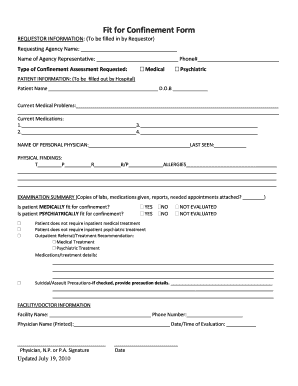
Fit for Confinement Form REQUESTOR INFORMATION: (To be filled in by Requestor) Requesting Agency Name: Name of Agency Representative: Phone# Type of Confinement Assessment Requested: Medical Psychiatric.

How it works

  1. Open form

    Open form follow the instructions

  2. Easily sign form

    Easily sign the form with your finger

  3. Share form

    Send filled & signed form or save

How to fill out the Fit For Confinement online

Filling out the Fit For Confinement form online is a straightforward process designed to ensure that all necessary information is accurately captured for proper assessment. This guide will walk you through each section and field, providing detailed instructions to help you complete the form effectively.

Follow the steps to accurately complete the Fit For Confinement form.

  1. Click the ‘Get Form’ button to access the form and open it in your preferred online editor. This will allow you to start filling out each required section.
  2. In the 'Requestor Information' section, fill in the requesting agency's name, the name of the agency representative, and their phone number. Choose the type of confinement assessment you are requesting; either medical or psychiatric.
  3. In the 'Patient Information' section, the hospital should provide the patient's name, date of birth, and document any current medical problems in the space provided. Include a detailed list of current medications.
  4. Under 'Personal Physician,' enter the name of the personal physician and the last time the patient was seen.
  5. In the 'Physical Findings' section, provide the patient's vital signs and note any allergies. Make sure to capture all relevant physical findings regarding the patient's condition.
  6. Fill out the 'Examination Summary,' including the necessary documentation like lab results, medications given, reports, and any needed future appointments.
  7. Answer the questions regarding the patient's medical and psychiatric fit for confinement by selecting either 'Yes,' 'No,' or 'Not Evaluated' for each category.
  8. Indicate whether the patient requires inpatient medical or psychiatric treatment. If applicable, note any outpatient recommendations along with specific details about medications or treatments.
  9. If there are any precautions related to suicidal thoughts or violent behavior, detail those in the space provided.
  10. Complete the 'Facility/Doctor Information' section by providing the facility name, phone number, the printed name of the physician evaluating the patient, and the date and time of evaluation. Ensure the physician or qualified personnel signs the form.
  11. Once all fields are completed, you can save your changes, download, print, or share the form as needed.

Start filling out the Fit For Confinement form online today to ensure all necessary evaluations are conducted properly.

Get form

Experience a faster way to fill out and sign forms on the web. Access the most extensive library of templates available.
Get form

Related content

JS Policy and Procedure 1401 - St. Louis County
'fit for confinement'. II. RESPONSIBILITIES. All St. Louis County Department of Justice...
Learn more
"Indeterminate Confinement: Letting the Therapy...
... Confinement: Letting the Therapy Fit the Harm, 123 U. Pa. L. Rev. 297 (1974)...
Learn more
Emily Dickinson - Wikipedia
The poems published then were usually edited significantly to fit conventional poetic...
Learn more

Related links form

Public Notice 8156 - Gpo Faculty Memorial Statements - The University Faculty - Cornell... Level As Well As Their Disposition - Gpo HFQLG Project Evaluation Form Project Name: Mabie Defensible ... - Fs Fed

Questions & Answers

Get answers to your most pressing questions about US Legal Forms API.

Contact support

Call log manager (Edit, Add, Backup, Restore). You can edit the time, date, duration, call type, and phone number for any call in the log. Also, you can add any call to the log with a specific time, date, during, and type. In other words, you can customize your log as you like.

1:27 2:17 Enable Click to Call in Excel (Skype or Jabber) - YouTube YouTube Start of suggested clip End of suggested clip And then. The phone number which I typically put right to the left of this clickable CEL. So that'sMoreAnd then. The phone number which I typically put right to the left of this clickable CEL. So that's how you do it in Excel good luck with that.

Start by building out your template with all the call details you want to keep track of—like the client name; the call's date, time, and duration; and any important information, like the call purpose and summary notes. Once you've built your basic template, you can duplicate and reuse it.

A call log is a record of phone calls used by sales teams to track client calls and contact information. If you manage a sales team, use our free Call Log Template to easily record and information about incoming and outgoing calls and determine the top-performing sales agents on your team.

On Android Devices Launch the Phone app. If the recent tab is not opened immediately, click on "Recent" at the bottom of the screen. Click on the number you want to check its recent call history. From the dropdown options on the number, tap History. In some devices, it should be Call details or the "i" icon.

If you would like to prevent your call history from appearing on your iOS mobile device, please follow these steps: Please select "App Settings" Choose "Device and Sounds" Toggle off “integrated call history”

So, how long will your phone hold onto this information? If you stop using iCloud, call information and other data from your last backup are stored for 180 days, and then it is deleted. Any location information gathered by your phone is kept for 24 hours and then deleted.

View and delete the call history on your iPhone Open the Phone app, then tap Recents to view a list of recent calls. Tap Edit. Delete your entire call history or a specific call. To clear all history, tap Clear, then tap Clear All Recents. To clear a single call, tap the Delete button , then tap Delete.

MobiStealth is a comprehensive call log monitoring app that works across all carriers. It offers real-time call tracking, call recording, and the ability to remotely access call logs.

View and delete the call history on your iPhone Open the Phone app, then tap Recents to view a list of recent calls. Tap Edit. Delete your entire call history or a specific call. To clear all history, tap Clear, then tap Clear All Recents. To clear a single call, tap the Delete button , then tap Delete.

Get This Form Now!

Use professional pre-built templates to fill in and sign documents online faster. Get access to thousands of forms.
Get form
If you believe that this page should be taken down, please follow our DMCA take down processhere.

Industry-leading security and compliance

US Legal Forms protects your data by complying with industry-specific security standards.
  • In businnes since 1997
    25+ years providing professional legal documents.
  • Accredited business
    Guarantees that a business meets BBB accreditation standards in the US and Canada.
  • Secured by Braintree
    Validated Level 1 PCI DSS compliant payment gateway that accepts most major credit and debit card brands from across the globe.
Get Fit For Confinement
Get form
  • Adoption
  • Bankruptcy
  • Contractors
  • Divorce
  • Home Sales
  • Employment
  • Identity Theft
  • Incorporation
  • Landlord Tenant
  • Living Trust
  • Name Change
  • Personal Planning
  • Small Business
  • Wills & Estates
  • Packages A-Z
  • Affidavits
  • Bankruptcy
  • Bill of Sale
  • Corporate - LLC
  • Divorce
  • Employment
  • Identity Theft
  • Internet Technology
  • Landlord Tenant
  • Living Wills
  • Name Change
  • Power of Attorney
  • Real Estate
  • Small Estates
  • Wills
  • All Forms
  • Forms A-Z
  • Form Library
  • Legal Hub
  • About Us
  • Help Portal
  • Legal Resources
  • Blog
  • Affiliates
  • Contact Us
  • Delete My Account
  • Site Map
  • Industries
  • Forms in Spanish
  • Localized Forms
  • State-specific Forms
  • Forms Kit
  • Real Estate Handbook
  • All Guides
  • Notarize
  • Incorporation services
  • For Consumers
  • For Small Business
  • For Attorneys
  • USLegal
  • FormsPass
  • pdfFiller
  • signNow
  • altaFlow
  • DocHub
  • Instapage
Form Packages
  • Adoption
  • Bankruptcy
  • Contractors
  • Divorce
  • Home Sales
  • Employment
  • Identity Theft
  • Incorporation
  • Landlord Tenant
  • Living Trust
  • Name Change
  • Personal Planning
  • Small Business
  • Wills & Estates
  • Packages A-Z
Form Categories
  • Affidavits
  • Bankruptcy
  • Bill of Sale
  • Corporate - LLC
  • Divorce
  • Employment
  • Identity Theft
  • Internet Technology
  • Landlord Tenant
  • Living Wills
  • Name Change
  • Power of Attorney
  • Real Estate
  • Small Estates
  • Wills
  • All Forms
  • Forms A-Z
  • Form Library
Customer Service
  • Legal Hub
  • About Us
  • Help Portal
  • Legal Resources
  • Blog
  • Affiliates
  • Contact Us
  • Delete My Account
  • Site Map
  • Industries
  • Forms in Spanish
  • Localized Forms
  • State-specific Forms
  • Forms Kit
Legal Guides
  • Real Estate Handbook
  • All Guides
Prepared for you
  • Notarize
  • Incorporation services
Our Customers
  • For Consumers
  • For Small Business
  • For Attorneys
Our Sites
  • USLegal
  • FormsPass
  • pdfFiller
  • signNow
  • altaFlow
  • DocHub
  • Instapage
Social Media
Call us now toll free:
+1 833 426 79 33
As seen in:
© Copyright 1999-2026 airSlate Legal Forms, Inc. 3720 Flowood Dr, Flowood, Mississippi 39232
  • Your Privacy Choices
  • Terms of Service
  • Privacy Notice
  • Content Takedown Policy
  • Bug Bounty Program