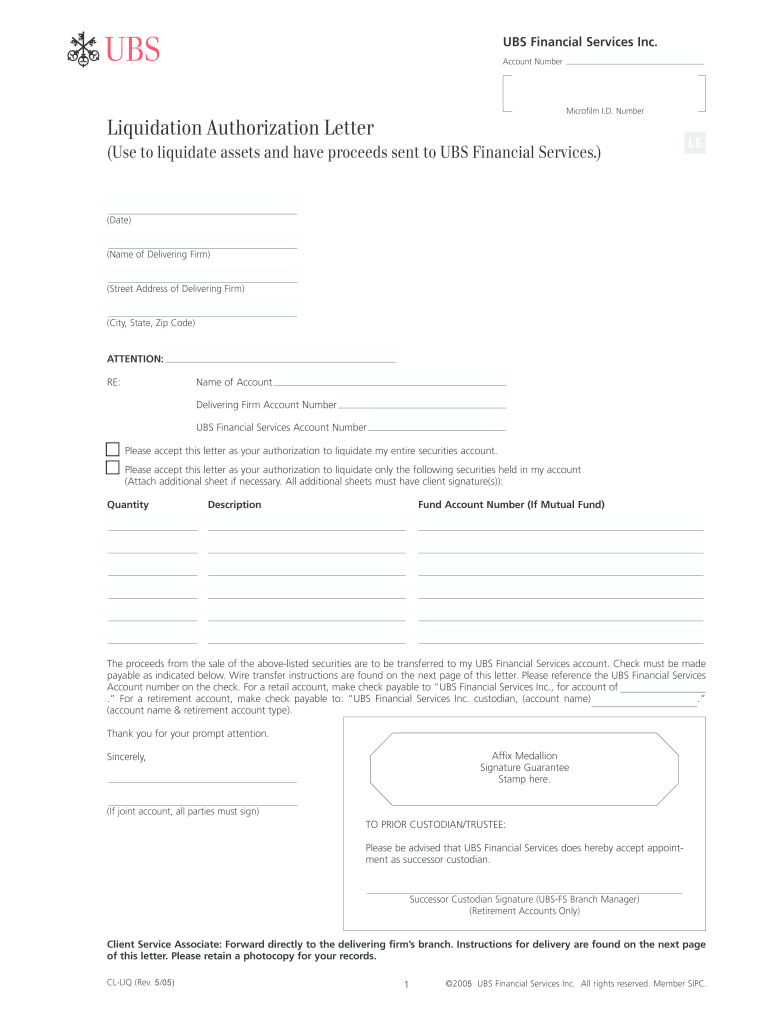
RESET ab UBS Financial Services Inc. Account Number Microfilm I. D. Number Liquidation Authorization Letter Use to liquidate assets and have proceeds sent to UBS Financial Services. LE Date Name of Delivering Firm Street Address of Delivering Firm City State Zip Code ATTENTION RE Name of Account Delivering Firm Account Number Please accept this letter as your authorization to liquidate my entire securities account. LE Date Name of Delivering Firm Street Address of Delivering Firm City State Zip Code ATTENTION RE Name of Account Delivering Firm Account Number Please accept this letter as your authorization to liquidate my entire securities account. Attach additional sheet if necessary. All additional sheets must have client signature s Quantity Description Fund Account Number If Mutual Fund The proceeds from the sale of the above-listed securities are to be transferred to my UBS Financial Services account. RESET ab UBS Financial Services Inc* Account Number Microfilm I. D. Number Liquid....
Loading

Open form follow the instructions

Easily sign the form with your finger

Send filled & signed form or save
How to fill out the Ubs Authorization Form online
The Ubs Authorization Form is an essential document for users wishing to authorize the liquidation of their securities account. Completing this form accurately is important to ensure the smooth transfer of proceeds to your UBS Financial Services account.
Follow the steps to fill out the Ubs Authorization Form online.
- Click ‘Get Form’ button to obtain the form and open it in the editor.
- Start by entering your account number and microfilm I.D. number at the top of the form. This information is necessary to identify your account accurately.
- Fill out the date and the details of the delivering firm, including the name, street address, city, state, and zip code. This information allows UBS to communicate with the delivering firm.
- In the attention section, clearly state the name of the account and the delivering firm’s account number, alongside your UBS Financial Services account number. This ensures clear referencing of the accounts involved.
- Indicate whether you are authorizing the liquidation of your entire securities account or only specific securities. If only specific securities are to be liquidated, list the quantity and description of each security. You can attach an additional sheet if necessary, ensuring each sheet is signed.
- Specify the fund account number if liquidating mutual funds. This clarifies which particular mutual funds are being liquidated.
- Choose where the proceeds from the sale should be transferred. Ensure to specify whether checks must be made payable to UBS Financial Services Inc. directly or to the account name detailed in the retirement account instructions.
- Affix the medallion signature guarantee stamp in the designated area after obtaining it from an authorized financial institution or firm.
- If applicable, have all parties sign if it is a joint account. All signatures are essential for the authorization to be accepted.
- Finally, review all entered information for accuracy before saving any changes, downloading, printing, or sharing the form as needed.
Complete your documents online today for a hassle-free experience.
Experience a faster way to fill out and sign forms on the web. Access the most extensive library of templates available.
Related content
UBS AG - Registration Statement for Debt Securities and Warrants ... be consistent with...
Accruals Form; ACH Authorization Form. Please Contact Accounts Payable at...
UBS-Axcera 200W UHF Digital Transmitter Users Manual ... Display Format, Adobe Acrobat PDF...
Get answers to your most pressing questions about US Legal Forms API.
How do I withdraw money from UBS?
Access funds Access cash with your UBS debit card or use your UBS credit card to get cash at banks and ATMs worldwide without finance charges or cash advance fees provided you have sufficient funds available in your linked UBS brokerage account.
How do I manually transfer money from one bank to another?
Here are four ways to transfer money from your bank to another institution. Wire transfers. ... Mobile apps. ... Email money transfers (EMTs) ... Write a check. ... 6 ways to deposit cash into someone else's account.
How do I transfer money from my UBS account to another bank?
1. Log into Digital Banking and select “Menu”. 2. Select “Account Transfers”, followed by “Account Transfers”.
How do I link my external account to UBS?
To view UBS accounts and external accounts linked via paper, navigate to Transfer Funds under Banking Services and select Manage Accounts under Funds Transfer. 3. Add external accounts from the Manage accounts tab. Under the Manage accounts tab select Add External account and then Get started.
How do I transfer money from UBS to another bank?
1. Log into Digital Banking and select “Menu”. 2. Select “Account Transfers”, followed by “Account Transfers”.
How do I transfer money directly to another bank account?
Steps for Transferring Money Between Banks Log into your bank's website or connect via the bank's app. Click on the transfer feature and choose transfer to another bank. Enter the routing and account numbers for the account at the other bank. Make the transfer.
How long does a UBS bank transfer take?
Same Day Transfers entered to your UBS Credit Line Account after 5:00PM ET, Monday through Friday will be initiated on the next business day. If the "Transfer Date" of a scheduled transfer falls on a weekend or holiday, we will initiate the transfer on the NEXT business day.
How do I contact UBS customer service?
Or contact Client Relations at 800-354-9103 from 8:00 a.m. to 5:00 p.m. Eastern Time, Monday through Friday. *Important note: Please do not e-mail any confidential or account information or instructions (such as orders to trade securities, to transfer funds or to change account information).
Use professional pre-built templates to fill in and sign documents online faster. Get access to thousands of forms.
If you believe that this page should be taken down, please follow our DMCA take down process here.