Loading
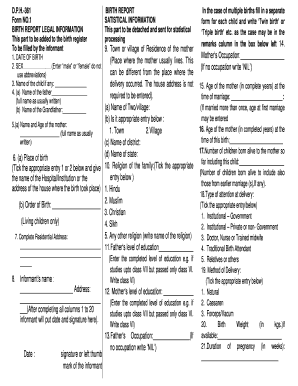
Get Dph 361 Birth Report Legal Information Forms
How it works
-

Open form follow the instructions
-

Easily sign the form with your finger
-

Send filled & signed form or save
How to fill out the Dph 361 Birth Report Legal Information Forms online
The Dph 361 Birth Report Legal Information Forms are essential for registering a birth and providing critical data for statistical purposes. This guide will help you understand how to navigate and complete the form online, ensuring that you provide accurate and necessary information.
Follow the steps to successfully complete the Dph 361 Birth Report Legal Information Form online.
- Use the ‘Get Form’ button to access the Dph 361 Birth Report Legal Information Form and open it in your preferred editor.
- Enter the date of birth in the designated field, using the correct format to avoid any confusion.
- Indicate the sex of the child by selecting either 'male' or 'female'—do not use abbreviations.
- If applicable, input the name of the child in the provided space.
- Complete the name of the father, ensuring that the full name is recorded as usually written.
- Provide the name of the grandfather in the respective field.
- Fill in the mother’s full name and age, again writing it as it is usually expressed.
- Select the place of birth by ticking the appropriate entry and include the relevant hospital or home address.
- Record the order of birth, listing living children only, in the specified space.
- Provide the complete residential address of the family.
- Include the informant’s name and address, and ensure to sign and date your entry at the bottom of this section.
- Mark the town or village of residence of the mother as needed.
- Indicate the religion of the family by ticking the suitable entry.
- Document the father’s level of education in the provided field.
- Record the mother’s level of education in the same manner.
- Input the father's occupation, noting 'NIL' if there is none.
- For multiple births, remember to fill out a separate form for each child and note the type of multiple birth in the remarks box.
- Affirm the mother’s occupation similarly, marking 'NIL' if applicable.
- Document the age of the mother at the time of marriage.
- Indicate the age of the mother at the time of this birth.
- Count the number of children born alive to the mother so far, including from previous marriages.
- Select the type of attention during delivery by ticking the appropriate option.
- Choose the method of delivery that applies from the provided options.
- If available, enter the birth weight in kilograms.
- Lastly, indicate the duration of pregnancy in weeks.
- Once all sections are completed, review the form for accuracy. You can then save your changes, download, print, or share the form as needed.
Complete your Dph 361 Birth Report Legal Information Form online today to ensure accurate registration.
A Delayed Registration of Birth is utilized to register a California Birth when: The birth was not registered within the first year. A certified copy of the original birth certificate is not obtainable. Proper evidence and affidavits supporting the California birth are available.