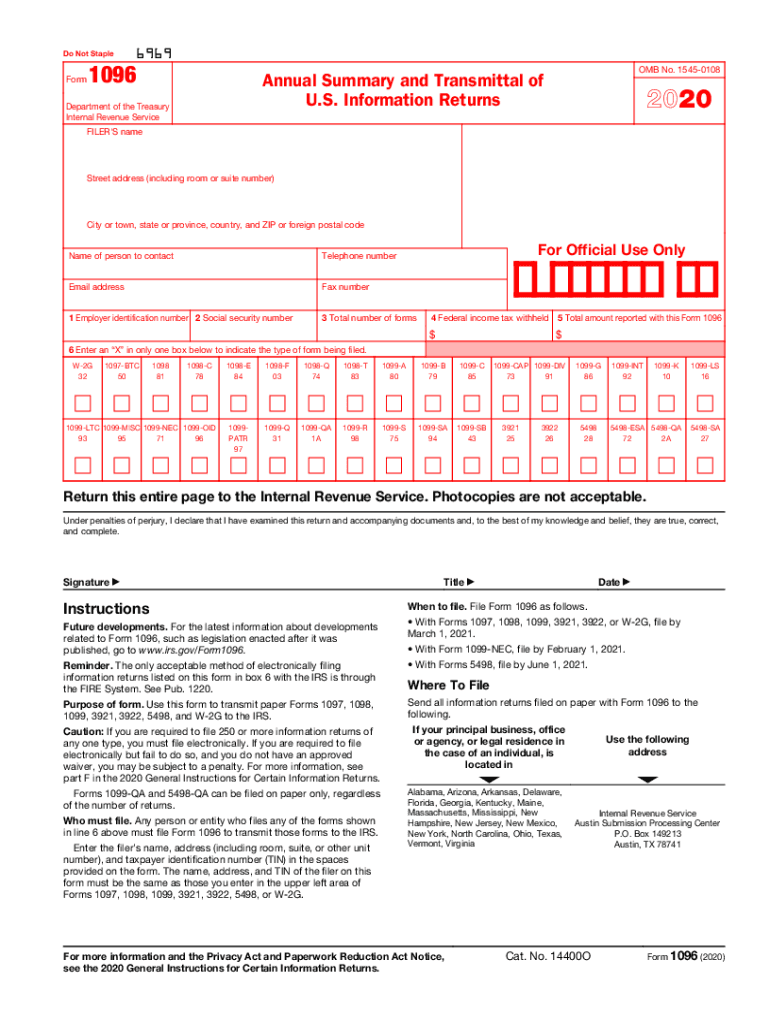
But a copy, printed from this website, is not. Do not print and file a Form 1096 downloaded from this website; a penalty may be imposed for filing with the IRS information return forms that can t be scanned. See part O in the current General Instructions for Certain Information Returns, available at www.irs.gov/form1099, for more information about penalties. To order official IRS information returns, which include a scannable Form 1096 for filing with the IRS, visit www.IRS.gov/orderforms. Cl.
Loading

Open form follow the instructions

Easily sign the form with your finger

Send filled & signed form or save
How to fill out the 1096 online
Filing Form 1096 is an important step for anyone transmitting information returns to the IRS. This guide provides clear, step-by-step instructions for completing the form online, ensuring you are informed and prepared for the process.
Follow the steps to complete your Form 1096 online.
- Click the ‘Get Form’ button to access the form and open it in the online editor.
- Begin by entering the filer’s name, followed by the street address, city or town, state or province, country, and ZIP or foreign postal code.
- Provide the name of the person to contact, along with a telephone number, email address, and fax number.
- In Box 1, enter your Employer Identification Number (EIN) or in Box 2, enter your Social Security Number (SSN), but do not fill both boxes.
- In Box 3, enter the total number of information forms you are transmitting with this Form 1096. Do not include any blank or voided forms.
- For Box 4, indicate the total federal income tax withheld shown on the forms you are submitting.
- In Box 5, if applicable, enter the total amount reported along with this Form 1096, based on the specific requirements of the forms you are filing.
- In Box 6, check only one box to indicate the type of forms you are transmitting, using the appropriate code.
- After completing all relevant sections, review the form for accuracy, then save your changes. You may also choose to download, print, or share the completed form.
Complete your documents online to ensure compliance and accuracy.
Experience a faster way to fill out and sign forms on the web. Access the most extensive library of templates available.
Related content
When to file. File Form 1096 as follows. • With Forms 1097, 1098, 1099, 3921, 3922, or...
Registration on the supplemental register or under the Act of March 19, 1920, shall not be...
The University of Oxford is a collegiate research university in Oxford, Oxfordshire...
Get answers to your most pressing questions about US Legal Forms API.
Do I need to file a 1096 form?
You must submit a separate 1096 for every type of information return you prepared, even if you prepared only one of each kind. If you have 250 or more of any type of information return, you must electronically submit that type of return instead of using Form 1096.
Do I send 1096 and 1099 together?
You must mail or hand Form 1099 MISC Copy B and Form 1099 MISC Copy 2 to each independent contractor/partnership/LLC by January 31st. You must mail Form 1096 and the accompany 1099 MISC Copy A forms (the 1096 and 1099 Copy A forms must be together) to the IRS by February 28th.
How do I get my 1096 form?
To order official IRS information returns, which include a scannable Form 1096 for filing with the IRS, visit www.IRS.gov/orderforms. Click on Employer and Information Returns, and we'll mail you the forms you request and their instructions, as well as any publications you may order.
What is a 1096 tax form used for?
Form 1096 is a cover sheet used to mail forms for reporting non-employee income to the IRS. If you're a small business, odds are you'll mainly be using it to submit Form 1099, the form you use to tell the IRS whenever you've paid an independent contractor more than $600 in a financial year.
Use professional pre-built templates to fill in and sign documents online faster. Get access to thousands of forms.
If you believe that this page should be taken down, please follow our DMCA take down process here.
This form is available in several versions. Select the version you need from the drop-down list below.