Located on the OMB Internet Page at www.whitehouse.gov/omb/library/OMBINV. html#VA. If desired, you can call 1-800-827-1000 to get information on where to .
Loading

Open form follow the instructions

Easily sign the form with your finger

Send filled & signed form or save
How to fill out the Va Form 21 4138 Jun 2000 online
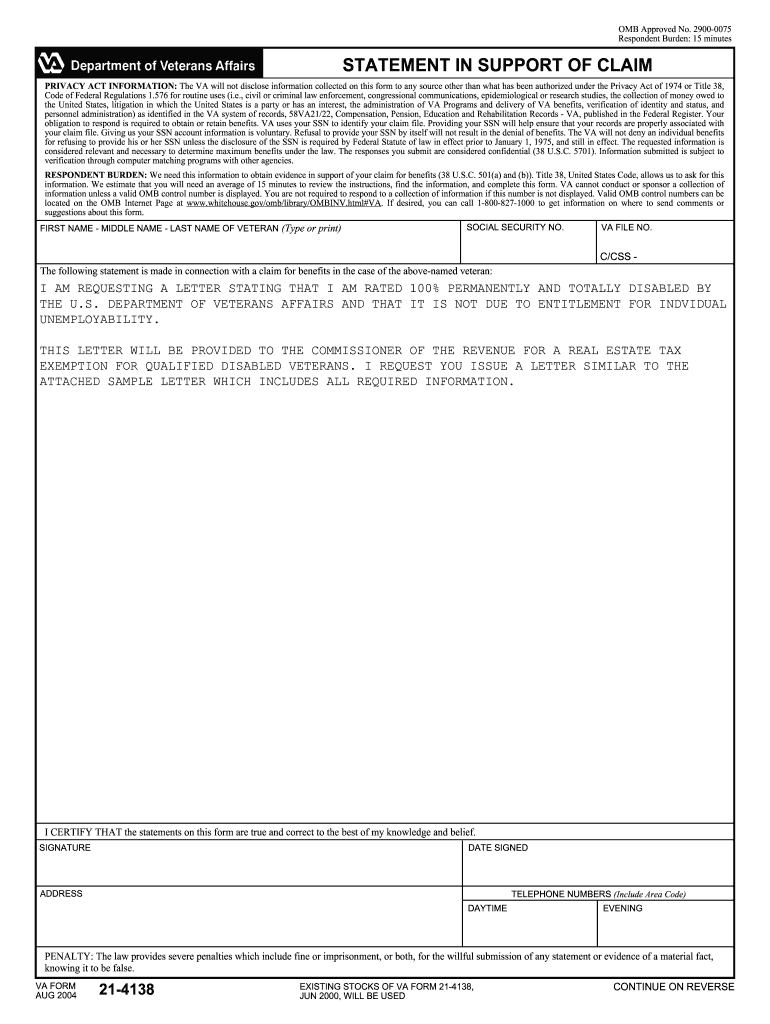
The Va Form 21 4138, also known as the statement in support of claim, is an important document for veterans seeking benefits. This guide will provide you with clear, step-by-step instructions on how to complete this form online, ensuring your application is accurately submitted.
Follow the steps to successfully complete the Va Form 21 4138 online.
- Click the ‘Get Form’ button to obtain the form and open it in the online editor.
- Provide basic information about the veteran, including their first name, middle name, and last name. Ensure accuracy, as this information is crucial for identification purposes.
- Input the veteran's social security number and VA file number. This information helps to associate the claim with the correct veteran’s record.
- In the statement section, clearly indicate your request for a letter confirming the veteran's 100% permanent and total disability rating. Specify that the letter is for a real estate tax exemption.
- Include any desired wording that resembles the attached sample letter mentioned in the form to make your request clear to the VA.
- Certify the accuracy of the statements by signing the form. Make sure to include the date signed.
- Complete the address and telephone number fields. This allows the VA to contact you if necessary.
- Review all information for completeness and accuracy before proceeding.
- Once you are satisfied with the completed form, save your changes, download, print, or share the form as required for submission.
Take the necessary steps to complete your Va Form 21 4138 online today.
Experience a faster way to fill out and sign forms on the web. Access the most extensive library of templates available.
Related content
Oct 21, 2020 — Get VA Form 21-4138, Statement in Support of Claim. Use this VA form to...
EXISTING STOCKS OF VA FORM 21-4138, JAN 2015,. WILL BE USED. Page 1. INSTRUCTIONS: Read...
1&0 WATT - 230 VOLT D.C. • 2000 R.P.H.. 8/29132 ... TBL·S. STARTER. ZlO V. a.c. 3.5...
Get answers to your most pressing questions about US Legal Forms API.
What is the VA form used for?
When to use this form. Use VA Form 21-526EZ when you want to apply for VA disability compensation (pay) and related benefits.
Is VA Form 21-4138 obsolete?
In 2021, the VA replaced the VA Form 21-4138 with five new forms. These five new forms will help veterans better communicate specific requests to the VA, and even expedite the claims process.
What is the difference between VA Form 21 10210 and 21-4138?
VA Form 21-10210 is used to provide information about an in-service injury or to give an update on the current severity of their service-connected conditions. However, VA form 21-4138 is no longer in use and the VA Form 21-10210 has been updated to replace it.
How does a buddy fill out VA Form 21-4138?
0:33 2:10 Service once every field has been completed and checked off date and sign the va. Form 21-4138MoreService once every field has been completed and checked off date and sign the va. Form 21-4138 statement in support of claim. Directly in the editor.
What is the VA Form 21-4138 used for?
Use VA Form 21-4138 when you want to submit a VA “buddy statement” or other statement from someone with firsthand knowledge of information you believe will help support your request for VA benefits.
How to fill out VA Form 21-4138 for a buddy?
0:24 1:53 Write a draft of your statement. Ensure. That your draft includes a very detailed explanationMoreWrite a draft of your statement. Ensure. That your draft includes a very detailed explanation addressing. All of the required. Additional information the Department of Veterans Affairs requires.
Use professional pre-built templates to fill in and sign documents online faster. Get access to thousands of forms.
If you believe that this page should be taken down, please follow our DMCA take down process here.