Loading
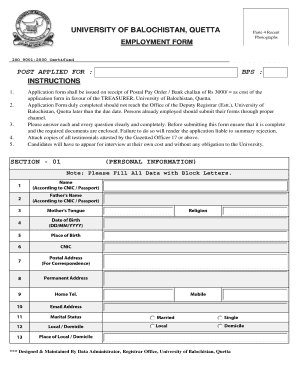
Get Uob
How it works
-

Open form follow the instructions
-

Easily sign the form with your finger
-

Send filled & signed form or save
How to fill out the Uob online
Filling out the University of Balochistan (Uob) employment form online can be a straightforward process if you follow the right steps. This guide will provide you with a comprehensive overview of the form's components and detailed instructions for each section.
Follow the steps to successfully complete the Uob employment form.
- Click 'Get Form' button to access the employment form and open it for editing.
- Begin by entering the 'post applied for' at the beginning of the form, ensuring you select the correct position you wish to apply for.
- Fill in your personal details, including name, father's name, and contact information. Ensure all information is accurate and up-to-date.
- Proceed to 'Section 04' where you will list your job experience. Start with your present position and list previous roles in reverse chronological order, providing details such as job title, monthly pay, employer/department, total service, and core responsibilities for each role.
- Move to 'Section 05' to document any research publications. Include details such as the date of publication, journal title, and volume number for each publication, attaching extra sheets if necessary.
- In the 'Certificate of Department Permission' section, complete the required details regarding your current post and departmental permission to apply.
- Review the checklist at the end of the form to ensure all required documents are attached, including photographs, identification copies, degree certificates, a bank challan, and any other relevant documents.
- Double-check that all sections of the form are filled out completely and clearly before submitting. Ensure the required documents are enclosed, as incomplete submissions may lead to summary rejection.
- Once you have confirmed that everything is in order, save your changes, and you may choose to download, print, or share the completed form as necessary.
Complete your Uob employment form online today and take the next step towards your career.
Log in to internet-banking.dbs.com.sg. Navigate to "My Accounts" Select "View eStatement and eAdvice" Select "Manage eStatement and eAdvice" Select your statement(s) and your preferred way to be notified. You're are all set!
Industry-leading security and compliance
US Legal Forms protects your data by complying with industry-specific security standards.
-
In businnes since 199725+ years providing professional legal documents.
-
Accredited businessGuarantees that a business meets BBB accreditation standards in the US and Canada.
-
Secured by BraintreeValidated Level 1 PCI DSS compliant payment gateway that accepts most major credit and debit card brands from across the globe.