Loading
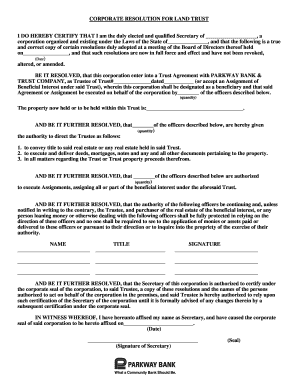
Get Corporate Resolution Template Word
How it works
-

Open form follow the instructions
-

Easily sign the form with your finger
-

Send filled & signed form or save
How to fill out the Corporate Resolution Template Word online
This guide is designed to assist you in effectively completing the Corporate Resolution Template Word online. The instructions will provide you with detailed steps to ensure that you fill out each section of the form accurately and confidently.
Follow the steps to complete your corporate resolution template.
- Use the ‘Get Form’ button to access the Corporate Resolution Template and open it in your preferred document editor.
- Begin by filling in the name of the corporation at the top of the document where indicated.
- Next, input the state under which the corporation is organized and existing.
- Specify the date when the Board of Directors meeting was held.
- In the resolution section, enter the name of the Trust Agreement party (PARKWAY BANK & TRUST COMPANY) and fill in the Trust number and date.
- Designate the officers who will execute the Agreement or Assignment on behalf of the corporation.
- Provide a description of the property held within the Trust.
- List the officers granted authority to direct the Trustee regarding the Trust's property.
- Outline the specific actions these officers are authorized to undertake, such as conveying title and executing documents.
- Authorize additional officers to execute Assignments related to the beneficial interest.
- State that the authority of designated officers will continue until otherwise notified.
- Have the Secretary certify the resolutions at the conclusion, including their signature and affixing the corporate seal.
- Finally, check that all sections are complete, and then save, download, print, or share the completed form as needed.
Start filling out your Corporate Resolution Template online today to ensure your corporation's decisions are documented properly.
Format the resolution by putting the date and resolution number at the top. ... Form a title of the resolution that speaks to the issue that you want to document. ... Use formal language in the body of the resolution, beginning each new paragraph with the word, whereas.