Loading
Get Form R-209c Rev 03/05 - Mass
How it works
-

Open form follow the instructions
-

Easily sign the form with your finger
-

Send filled & signed form or save
How to fill out the Form R-209C Rev 03/05 - Mass online
This guide provides clear and user-friendly instructions for filling out the Form R-209C Rev 03/05 online. Following these steps will ensure that users complete the form accurately and efficiently, facilitating the process of submitting important legal documents.
Follow the steps to complete your Form R-209C Rev 03/05 online.
- Click ‘Get Form’ button to access the form and open it for editing.
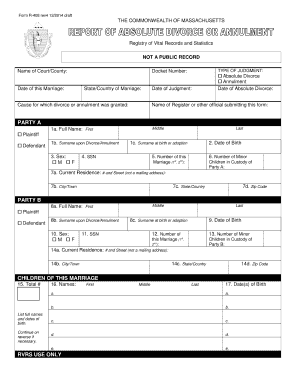
- Begin with the 'Name of Court/County' section, where you will enter the relevant court or county name where the marriage or divorce is being processed.
- Add the 'Date of this Marriage' in the specified format. This date is critical for validating your document.
- Indicate the 'Type of Judgment' by selecting either 'Absolute Divorce' or 'Annulment' as appropriate.
- Enter the 'Docket Number,' which can be obtained from court documents related to your case.
- Specify the 'State/Country of Marriage' to detail where the marriage took place.
- Describe the 'Cause for which divorce or annulment was granted.' It may be beneficial to reference court documentation here.
- Record the 'Date of Judgment,' which is the date the court finalized the divorce or annulment.
- Complete the 'Party A' section by entering all required personal information, including full name, surname upon divorce, sex, SSN, and date of birth.
- Fill out the 'Current Residence' for Party A, ensuring accuracy in the street address, city/town, state/country, and zip code.
- Repeat the same process for 'Party B' by entering their respective details in the designated fields.
- In the 'Children of this Marriage' section, list the total number of children along with their full names and dates of birth.
- Review all entries to ensure completeness and accuracy. It's important to fill every relevant field to avoid delays.
- Once all information is reviewed, you can save the form, download it, print it for mailing, or share it as needed.
Complete your documents online today to ensure timely processing and accuracy.
After the Final Divorce Hearing in Massachusetts After your final divorce hearing, the Massachusetts Probate and Family Court will mail you a copy of the judgment of divorce. There is a mandatory waiting period in Massachusetts after the judge grants the divorce called the nisi period.