Loading
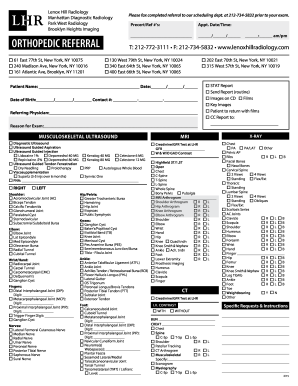
Get Lenox Hill Radiology Referral Form
How it works
-

Open form follow the instructions
-

Easily sign the form with your finger
-

Send filled & signed form or save
How to fill out the Lenox Hill Radiology Referral Form online
Filling out the Lenox Hill Radiology Referral Form online is a straightforward process that ensures all necessary information is accurately provided for your radiology exam. This guide will walk you through the steps required to complete the form efficiently and effectively.
Follow the steps to fill out the Lenox Hill Radiology Referral Form online
- Click ‘Get Form’ button to access the Lenox Hill Radiology Referral Form and open it in the editor.
- Begin by entering the patient's name in the designated field, ensuring accuracy to avoid any potential issues on the day of the appointment.
- Fill in the date of the completion of the form as well as the patient's date of birth in the specified sections.
- Provide a contact number where the patient or guardian can be reached in case of necessary communication.
- In the 'Referring Physician' section, include the name of the healthcare provider who is referring the patient for the exam.
- Specify the reason for the exam in the provided field to give context for the requested procedure.
- Select the appropriate type of exam from the list of options available, such as musculoskeletal ultrasound, MRI, CT, or X-ray, checking the relevant boxes.
- For specific requests or instructions, use the designated area to note any special circumstances or additional information pertinent to the exam.
- Once all applicable fields are completed, review the form for any errors or omissions before finalizing.
- You can save the changes, download the completed form, or print it directly from the online document.
Complete your Lenox Hill Radiology Referral Form online today for a seamless appointment experience.
NEW TAX ID: 13-3425028.